Small business IT support that hands you back your week.
For owners of businesses with 5 to 30 people, where IT has landed on you or whoever's handy. Our engineers take over the help desk, the updates, the backups and the security, and in the first month you see what was found and fixed. If you don't need us yet, this page says so.
Our engineers answer in business hours, Monday to Friday, with 24/7 security monitoring. Remote first, from Brisbane, for businesses across Australia.
What you get
Every person, every laptop and every login looked after, from your first hire to your thirtieth.
This isn't a number you ring when something breaks. It's the day to day of IT, done for you, with the same security on every plan whatever its size.
01For each person on your team
A help desk that answers in business hours, by phone, email, portal or Teams
Their laptop and phone kept up to date in the background
A Microsoft 365 Business Premium licence, included on every plan
A second sign-in step on their account, with Microsoft Authenticator
A password manager, set up for them, so shared logins stop
Security awareness training and practice phishing emails
02For the business
Microsoft 365 looked after: email, Teams, OneDrive and SharePoint
Check Point email security in front of every inbox
Guardz Elite with SentinelOne on every computer, with 24/7 security monitoring
Microsoft 365 backed up to storage that can't be changed or deleted, with restores tested
Two watched emergency admin accounts, so you're never locked out of your own Microsoft 365
Every account and admin login documented, and the copy is yours
03For you, the owner
One monthly price per person for the day to day; projects and hardware quoted before they start
New starters ready on day one, and leavers locked out on their last day
Licences checked, so you stop paying for seats nobody uses
A plain update on what was patched, backed up and blocked
Answers ready when the insurer's form arrives
Three months, then month to month on 60 days' notice, with no exit fees
Which plan a team your size usually lands on
People
How often you need help
Plan it usually suits
What that means
5 to 9
Rarely. A few jobs a month across the team.
Flex
Support paid for as you use it. Best effort, with no written response times.
10 to 25
Most weeks someone logs a job.
Advantage
A pooled block of support time each month, then a lower hourly rate. Response times in writing.
10 to 30, and asked to prove security
Often, or an insurer, client or tender wants evidence on file.
Ultimate
Unlimited remote support in business hours, response times in writing, and quarterly reviews.
From our Pricing page, November 2026. Every plan carries the same security stack and the Business Premium licence; only the way you pay for help changes. Advantage has a 5 seat minimum and Ultimate a 10 seat minimum.
You pick a plan by how often your team asks for help, not by how much protection you can afford.
Your first month
By the end of month one, you know what you have, and it's all looked after.
Drag through the first 60 days for a made-up office of 14 people and 15 computers. Each stage shows what our engineers do, what you do and what your staff notice.
Moves the office panel through the first 60 days.
ShowingBefore you sign
A chat, then a written plan.
We do
A free 30 minute chat, then a written plan: what we'd change, in what order, what stays as it is, and what it costs. Onboarding is quoted before you commit.
You do
Half an hour, and a rough idea of what you run.
Your staff notice
Nothing yet.
ShowingWeek 1
Keys found, basics on.
We do
Find and document every account and admin login, switch on a second sign-in step for everyone, and get every computer reporting in and patched.
You do
Admin access to Microsoft 365, and a contact at each site.
Your staff notice
A prompt to set up Microsoft Authenticator on their phone.
ShowingWeeks 2 to 4
Settled in.
We do
Enrol every device, get backups running with a test restore done, and show staff how to log a job. Our security stack goes on every computer and inbox.
You do
Ask each person to sign in once on their own computer.
Your staff notice
They log a job in a sentence and get a ticket number back, instead of coming to you.
ShowingMonth 2 onwards
Business as usual.
We do
Updates, backups and monitoring run in the background, and we check in on what's next, such as computers due for replacement.
You do
Someone who can say yes to fixes within a few days.
Your staff notice
Mostly nothing, which is the point.
The office, at a glanceBefore you sign
Admin logins
Nobody's sure who holds themFound and documented, copy yoursFound and documented, copy yoursKept current, copy yours
Computers reporting in and patched
Not checked yet15 of 1515 of 1515 of 15
People with a second sign-in step
6 of 1414 of 1414 of 1414 of 14
Devices enrolled and managed
0 of 154 of 1515 of 1515 of 15
Microsoft 365 backup
Not checkedNot checked yetRunning, test restore doneRunning, restores tested
Security on every computer and inbox
Whatever was thereBeing plannedGuardz Elite with SentinelOne, Check PointWatched 24/7
Who staff ask for help
YouYou, mostlyOur help deskOur help desk
Illustrative: a made-up office of 14 people and 15 computers, not a client. The stages follow our usual onboarding; your written plan sets the real timing before you commit.
Why your size is the hard one
Too big for whoever's handy. Too small for a full-time IT hire.
Past about five people, IT stops being an occasional favour and becomes a weekly job, usually for someone who was hired to do something else. That's the gap small business IT support is for.
Australian businesses with staff, by number of employees
1 to 4 employees689,600
5 to 19 employees232,912
20 to 199 employees68,325
200 or more employees5,366
Australian businesses with staff, by number of employees
Employees
Businesses
1 to 4 employees
689,600
5 to 19 employees
232,912
20 to 199 employees
68,325
200 or more employees
5,366
Actively trading employing businesses at 30 June 2026, 996,203 in all. From the Australian Bureau of Statistics, Counts of Australian Businesses, July 2022 to June 2026. Bars to scale.
Most Australian businesses with staff are small. At 30 June 2026, 232,912 had 5 to 19 employees and 68,325 had 20 to 199, according to the Australian Bureau of Statistics. At that size, IT usually lands on someone who already has another job.
They still hold data worth stealing. auDA's 2026 research found 92% of small businesses hold personal or sensitive data, and only 26% feel confident they can protect it.
The fix isn't more software. It's making IT someone's actual job, and at your size that's easier to buy than to hire.
The cost you feel first is time.
When the ABS asked businesses that had a cyber security incident in 2024-25 what it did to them, losing time came top, ahead of losing money. Of those businesses, 63% were adversely affected in some way.
In a business of 12, a lost day for the person who does IT is a lost day of their real job too. See how we run cyber security.
When an incident hits, time goes first
Loss of time36%
Financial loss18%
Service downtime17%
Lost staff productivity16%
When an incident hits, time goes first
Impact
Share of businesses
Loss of time
36%
Financial loss
18%
Service downtime
17%
Lost staff productivity
16%
Share of Australian businesses that reported a cyber security incident in 2024-25, by impact. More than one could be chosen. From the Australian Bureau of Statistics, Characteristics of Australian Business, 2024-25.
Your part, and ours
You make the calls. We do the work, and tell you what we did.
You stay in charge of the business decisions. Everything technical sits with our engineers, written down so you can check it.
What you need to do
Name one person who can say yes to changes, and answers within a few days.
Hand over admin access, so nobody is locked out when a person leaves.
Tell us before someone starts or finishes.
Forward anything odd, such as a bank detail change or a strange sign-in prompt, before anyone acts on it.
Read the plain update, and ask about anything that doesn't make sense.
What we do for you
Answer your team in business hours, Monday to Friday. After hours, Chip, our AI receptionist, logs it and calls the on-call engineer for urgent P0 and P1 issues, best effort.
Patch computers in the background, so nobody has to remember.
Watch devices and accounts with Guardz Elite and SentinelOne, with 24/7 security monitoring.
Keep Microsoft 365 backed up, and test that it restores.
List computers nearing the end of Windows support, and plan their replacement with you.
Keep the documentation current, and hand it all over if you ever leave.
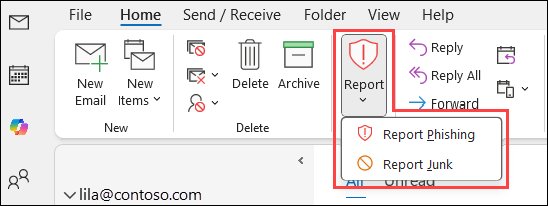
Outlook's Report button, in Microsoft's own screenshot. Forward first, act second: a suspicious email gets checked before anyone clicks or pays.
Microsoft: Business Premium: Intune, Entra ID and Defender for Business.
Guardz: Guardz Elite with SentinelOne on every computer.
Check Point: Email security in front of every inbox.
Our stack: Guardz with SentinelOne, Check Point, Microsoft, Ubiquiti UniFi, ConnectWise, Pax8. We also support, when a client already has them: Huntress, CrowdStrike, Sophos, Fortinet, Meraki, Veeam.
SMB1001 Diamond, independently audited by BSI · Verified TSS · Check our certificate. ASD Network Partner. 4.8 from 40+ Google reviews.
When you don't need us yet
Under five people and nothing's going wrong? You may not need us yet.
Plenty of small teams are fine on their own for a while. Here's how to tell, and the basics to do yourself in the meantime.
You can probably wait if
You're fewer than five people.
Everything runs in Microsoft 365 or Google Workspace and cloud apps, with no server or office network to look after.
Problems come up a few times a year, and someone sorts them in an hour.
Nobody, whether an insurer, a client or a tender, is asking you for security proof yet.
Do these yourself in the meantime
Turn on a second sign-in step for every account, the owner's first.Use an authenticator app on your phone, not text messages where you can avoid them. COSBOA's Cyber Wardens research found only one in two Australian small businesses use multi-factor authentication.
Let updates install by themselves.On every computer and phone, switch automatic updates on and restart when asked. Updates close the holes attackers already know about.
Use a password manager, and stop sharing logins.One strong password per account, kept in the manager. When someone leaves, you know exactly what to change.
Back up what you can't lose, somewhere separate, and try a restore.Email and files in the cloud still need their own backup. A backup you've never restored from is a guess.
Agree a call-back rule for bank details.Any email that changes a supplier's bank details gets a phone call to a number you already have, before anyone pays.
Signs it's time to hand it over
Setting up a new starter takes someone most of a day.
Nobody can say for sure who holds the admin passwords.
An insurer, client or tender sends you a security questionnaire.
Someone nearly paid a fake invoice.
The person who does IT is losing hours every week to it.
Two or more of those, and a free 30 minute chat is worth your time. If we can help, we send a written plan. If we can't, we'll tell you who can.
Questions
What small business owners ask before they hand IT over.
How much does it cost?
Plans start at A$150 a person a month ex GST, with Microsoft 365 Business Premium included, and every plan carries the same security. Project work is A$195 an hour, quoted before it starts. Every plan, and what's in and out of each, is on our Pricing page.
Is five people too small for managed IT support?
Not if IT is already taking someone's time. Our Flex plan is built for teams of 2 to 9 who rarely need help, with the same security as every other plan. If you're under five, everything's in the cloud and nothing's going wrong, do the five basics on this page yourself first.
How much of my own time does the first month take?
Half an hour for the first chat. In week one we need admin access to Microsoft 365 and a contact at each site. In the weeks after, each person signs in once on their own computer. Past that, we need someone who can say yes to fixes within a few days.
Will our staff have to change how they work?
A little, at the start. Everyone sets up Microsoft Authenticator on their phone as their second sign-in step, and learns to log a job by email, portal, phone or Teams. Most of the rest happens in the background.
Do we need to buy new computers?
Not usually. We list any computer on a Windows version near the end of its support, and plan its replacement with you, so it's budgeted rather than a surprise. Hardware is quoted separately, with our buy price and margin side by side.
What do we tell our current IT provider?
Tell them you're moving, and ask them to hand over admin access and any documentation. In week one we find and document every account and admin login anyway, so nothing depends on what anyone remembers.
What if we grow past 30 people?
Nothing has to change. Plans are priced per person, so new staff show on the next invoice. Ultimate suits businesses of 10 to 80, and Custom covers several sites or a team with its own IT person. Microsoft's business plans, Business Premium included, are for organisations of up to 300 users.
What does Microsoft 365 Business Premium add for a small business?
Everything in Business Standard, such as the Office apps, email, Teams and OneDrive, plus Microsoft's security tools: Intune to manage devices, Entra ID P1 for sign-in rules, Defender for Business on computers and Defender for Office 365 Plan 1 on email. It's included on every plan, and we set it up and keep it running.
Find out in 30 minutes whether you need us yet.
Tell us how many people you have, what you run and who does IT now. One of our engineers will say plainly whether we'd help, what your first month would look like and what it would cost.
You pick a time that suits you and one of our engineers calls. There's no slide deck. If we can help, we send a written plan; if we can't, we'll tell you who can. Nothing happens until you say yes.
Three months, then month to month on 60 days' notice. No exit fees. Onboarding is quoted before you commit. SMB1001 Diamond, independently audited by BSI. ASD Network Partner. 4.8 from 40+ Google reviews.

 Remote