
 Remote
Managed Microsoft 365, Brisbane and Australia wide
Microsoft 365, set up properly and looked after
For the owner, office manager or finance lead who ended up running Microsoft 365 on the side. We put you on the right licence, lock down sign-ins and admin access, and move your staff to passkeys before Microsoft retires SMS codes on 1 February 2027. Then our engineers look after it, month to month.
Check which Microsoft 365 plan fits you- SMB1001 Diamond, independently audited by BSI
- ASD Network Partner
- 4.8 from 40+ Google reviews
Which Microsoft 365 plan fits your business?
Microsoft sells three Business plans, and the names don't help. Answer four questions and we'll show you which one fits, and what the extra money buys. Nothing is saved or sent.
The plan that fits your answers
Microsoft 365 Business Premium
Business Premium is Business Standard plus the security pieces: Conditional Access to decide who signs in from where, Intune to manage laptops and phones, and Defender for Business on every device.3 Those are the controls insurers and client questionnaires ask about.
With Real Bytes you don't have to pick: every managed plan includes the Microsoft 365 Business Premium licence, because every plan carries the same security. Use the tool to understand what you're paying for, or to check what you're on today.
Your answers stay in your browser. The plan facts come from Microsoft Learn, checked 22 November 2026.
See what we set up in your first month| Business Basic | Business Standard | Business Premium Fits your answers | |
|---|---|---|---|
| Email, Teams and 1 TB of OneDriveEvery plan has a business mailbox, Teams and cloud file storage. | Included | Included | Included |
| Desktop Word, Excel and OutlookInstalled apps on computers, not just in the browser. | Web and phone only | Included | Included |
| Who can sign in, from whereEntra ID decides who gets in. P1 adds Conditional Access rules by country, device and risk. | Entra ID Free (security defaults) | Entra ID Free (security defaults) | Entra ID P1 (Conditional Access) |
| Company laptops and phones managedIntune sets up, updates and checks devices, and can wipe a lost one. | Basic Mobility and Security | Basic Mobility and Security | Intune Plan 1 |
| Protection on every deviceDefender for Business stops malware and ransomware on computers and phones. | Not included | Not included | Defender for Business |
| Extra checks on email and linksDefender for Office 365 checks attachments and links before staff open them. | Built-in filtering | Built-in filtering | Defender for Office 365 Plan 1 |
| Sensitive files labelled and kept inPurview labels and data loss prevention stop confidential files leaving by mistake. | Not included | Not included | Included |
| Size limitSeats across all Business plans together. | Up to 300 | Up to 300 | Up to 300 |
Source: Microsoft Learn, checked 22 November 2026.1234 Microsoft 365 E3 and E5 are for organisations past 300 seats.7
What changes for you, depending on your seat
The same tenant looks different from the owner's chair, the front desk and the accounts office. Pick yours.
I just need to know we're not one stolen password away from a disaster.
Illustrative scenario, based on situations we see often. Not a single client.
Your old IT contractor set Microsoft 365 up years ago. Nobody is sure who still has admin rights, and the insurer's renewal form asks whether you use MFA and Conditional Access.
You get a one-page summary of your tenant and a list of what we fixed, in plain words, that you can hand to the insurer or the board.
What we do
- Find every admin account and remove the ones nobody owns
- Turn on sign-in rules: Australia only, with named exceptions for people who travel
- Answer the Microsoft questions on the insurer's form with you
Everyone comes to me when they're locked out. I'm not technical.
Illustrative scenario, based on situations we see often. Not a single client.
A new bookkeeper starts Monday and a partner has just swapped phones and can't sign in. You're the one everyone asks.
You log it in a sentence and our engineers do the rest. New starters are ready on day one, and leavers are removed the same day with written confirmation.
What we do
- Set up new starters before they arrive, with the right access
- Get a locked-out person back in after checking it's really them
- Walk staff through passkeys so SMS codes stop being a problem
What are we actually paying Microsoft for, and is any of it wasted?
Illustrative scenario, based on situations we see often. Not a single client.
Microsoft's invoice has grown, there are licences for people who left last year, and a supplier just emailed new bank details that look a little off.
Licences match the people who work here, the cost is one known monthly figure, and suspicious bank-detail emails get checked by our help desk before anyone pays.
What we do
- Match licences to real people and stop paying for empty seats
- Put the Business Premium licence inside one monthly plan price
- Check suspicious bank-detail emails with you before money moves
Payment redirection scams, also called business email compromise, cost Australians $166.8 million in reported losses in 2025, up 9.3% on 2024.9 Most start with a mailbox someone else can sign in to.
Source: ACCC National Anti-Scam Centre, Targeting scams report 2025, Table 3, calendar year 2025.9
What we set up in your first month
Microsoft 365 has hundreds of settings. These are the ones we work through first, in this order, because they're where trouble starts. Typical timing for a 10 to 50 person business; yours goes in your written plan.
- Week 1
Tenant review
We look at admins, sign-in methods, licences, sharing and backup, and write up what we find in plain words.
What we need from you: Admin access through Microsoft's delegated admin model, and a list of who works here.
- Week 1 to 2
Fix the urgent things
Old and shared admin accounts removed, two emergency (break-glass) accounts set up and watched, and old sign-in methods that skip MFA switched off.
What we need from you: Confirm who still works here and who should have admin rights.
- Week 2 to 3
Apply our baseline
Our tested security policies go on through Inforcer, including sign-ins from Australia only. Every policy was built and tested on our own tenant first.
What we need from you: Tell us who works or travels overseas, so we add named exceptions.
- Week 2 to 4
Move staff to passkeys
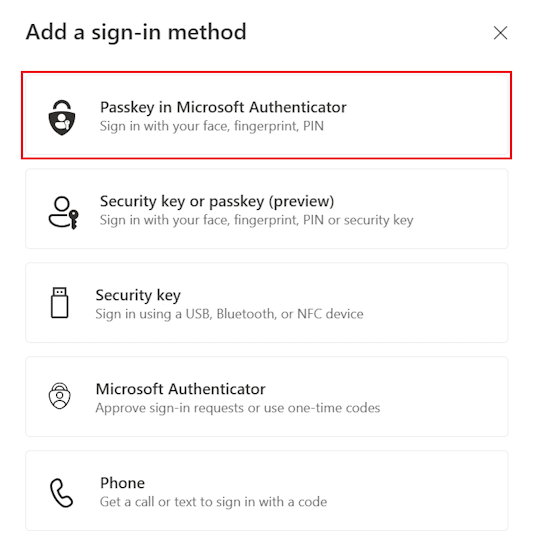
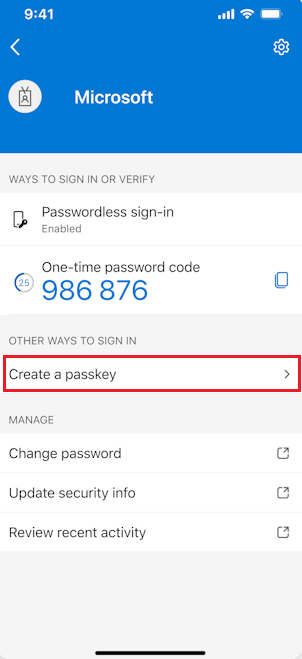
Each person sets up a passkey on their phone or Windows Hello on their laptop, with a short guide. No more text message codes.
What we need from you: About ten minutes per person, with their phone.
- Week 3 to 4
Devices and backup
Company laptops enrolled in Intune and checked before they get access. Mail, OneDrive, SharePoint and Teams backed up outside Microsoft, in immutable cloud backup.
What we need from you: A list of company laptops and phones.
- Then every month
Run and check
We watch for settings drifting from the baseline, handle alerts and requests, and keep licences matched to people.
What we need from you: Nothing extra. Log requests the way you already do.
SMS sign-in codes are being retired, and your staff will need passkeys
Microsoft is retiring the text message and phone call codes it sends for sign-in. From 1 February 2027, anyone whose only sign-in method is SMS or a phone call has to set up a passkey before they can sign in, with no way to skip it.5
A passkey is a sign-in that lives on your phone or laptop and unlocks with your face, fingerprint or PIN. It can't be read out to a scammer or typed into a fake login page.
Passkeys switched on
Microsoft turned on passkeys for people still using SMS or voice and started prompting them to register.
SMS and voice codes retire for most users
Anyone whose only method is SMS or voice must register a passkey before they can sign in. Microsoft says there is no opt out.
Global Administrators and external users
The same retirement for Global Administrators and external users.
Businesses with a real need to keep SMS can buy it from a telephony provider through Microsoft Security Store.5 For most of our clients, passkeys are the better answer and cost nothing extra.
Source: Microsoft Learn, Passkeys by default and retirement of Microsoft-provided SMS and voice authentication, checked 22 November 2026.5
See who looks after your tenantSoftware watches your tenant. A person who knows it decides.
Microsoft's tools raise the flags. Our engineers read them, decide what matters and fix it, and they're the same people who answer when you call.
- SMB1001 Diamond
- Independently audited by BSI. Check our certificate on CyberCert Verify.10
- Tested on us first
- Every security policy runs on Real Bytes' own Microsoft 365 tenant before it goes near yours.
- ASD Network Partner
- We work with the Australian Signals Directorate's partner network.
- 4.8 from 40+ Google reviews
- From the people who log jobs with us.
- Our engineers sign in to your tenant with their own named admin accounts and MFA, never a shared password.
- A baseline we apply through Inforcer, so one tested change is made once and checked across tenants.
- If we ever have a security incident of our own, you get written notice.
Our engineers answer in business hours, Monday to Friday. After hours, Chip, our AI receptionist, answers and logs the request, and the on-call engineer is called for urgent P0 and P1 issues, best effort. Security monitoring runs 24/7.
The people who look after your Microsoft 365
 Philip VernerDirector
 Blake BathGeneral Manager
 Mason WiseMSP Practice Lead
 Mitchell MorganAutomation & Platform Lead
 Travis JacobOperations Manager
 Bill Nobbs-O'BrienService Desk & Field Engineer
Photos: Real Bytes. Meet our engineers
When this isn't the right fit, and what we need from you
We'd rather tell you now than six months in.
It may not suit you if
- You have more than 300 people on Microsoft 365. The Business plans stop at 300 seats, so you need enterprise licensing and a different conversation.
- You want licences bought cheaply and nobody looking after them. That's a licence reseller, not managed Microsoft 365.
- On Google Workspace and staying there? See our Google Workspace page instead.
What we need from you
- Admin access through Microsoft's delegated admin model, not a shared password.
- One person who can approve changes, such as who gets admin rights.
- Ten minutes from each staff member to set up a passkey.
- A heads up when people start or leave, so access is ready or removed on the day.
Questions about managed Microsoft 365
How much does it cost?
Managing Microsoft 365 is part of every Real Bytes managed plan. Plans start at A$150 a person a month ex GST, with the Microsoft 365 Business Premium licence included, and every plan carries the same security services. For comparison, Microsoft's own list price for Business Premium alone is A$32.90 a user a month ex GST on an annual plan.8 Project work, such as a migration, is quoted before it starts. Every plan, and what is in and out of each, is on our Pricing page.
Which Microsoft 365 licence do we need?
If you have company devices or anyone asks about your security, Business Premium, because it adds Conditional Access, Intune and Defender for Business to Business Standard.3 Use the plan checker to see why. With us, every plan includes Business Premium, so there's nothing to choose.
Is Microsoft really turning off SMS codes?
Yes. Microsoft-provided SMS and voice sign-in retires on 1 February 2027 for most users, and on 1 July 2027 for Global Administrators and external users. After that, anyone whose only method is SMS or voice has to register a passkey before they can sign in, and Microsoft says there is no opt out.5
We already have someone who does our IT. Where do you fit?
Alongside them, if that suits you. We can run the Microsoft 365 security baseline, passkeys and backups while your IT person stays in charge of day-to-day support. You agree who does what before we start.
Doesn't Microsoft back up our data?
Microsoft keeps the service running and has retention settings, but retention isn't a backup you control, and an attacker with admin rights can change it. Every Real Bytes plan includes immutable cloud backup of mail, OneDrive, SharePoint and Teams.
How do you manage our tenant alongside other clients?
We use Inforcer to apply and check one security baseline across client tenants, so a change is made once and confirmed everywhere. New policies are built and tested on our own tenant first. Our engineers reach your tenant through Microsoft's delegated admin model, each with their own named account and MFA.
Can a new laptop go straight to the new starter?
Yes, with Windows Autopilot, which Business Premium supports. The laptop is set up with your apps and security settings when the person first signs in, so it can be shipped straight to them.6
Who answers when something breaks?
Our engineers answer in business hours, Monday to Friday. After hours, Chip, our AI receptionist, answers and logs the request, and the on-call engineer is called for urgent P0 and P1 issues, best effort. Security monitoring runs 24/7.
What if we want to leave?
Three months, then month to month on 60 days' notice. No exit fees. Onboarding is quoted before you commit. If you leave, we hand over every password and document, and your tenant stays yours.
Want to know what your tenant looks like?
Book a free 30 minute chat with one of our engineers. Tell us what's bothering you about Microsoft 365, and you'll leave with at least one thing you can fix yourself.
Three months, then month to month on 60 days' notice. No exit fees. Onboarding is quoted before you commit.
Already a client? Log a job in your portal or email helpdesk@realbytes.com.au.
What happens next
- You pick a time that suits you.
- One of our engineers calls you. It takes 30 minutes and it's free. There's no slide deck.
- If we can help, we send a written plan. If we can't, we'll tell you who can.
- Nothing happens until you say yes.
Related: Moving to passkeys, Conditional Access policy library, Identity and access management, Email security, Essential Eight compliance and Not for profit IT support.
Sources
Microsoft facts checked on Microsoft Learn and Microsoft Australia on 22 November 2026. Scam figures from the ACCC National Anti-Scam Centre. The small numbers on this page link here.
- Microsoft Learn, Microsoft 365 Business Premium frequently asked questions. 300 seat limit across the Business plans. Checked 22 November 2026
- Microsoft Learn, Microsoft 365 for business security overview. Entra ID, Intune and Defender by plan. Checked 22 November 2026
- Microsoft Learn, Add Microsoft Defender Suite for Business Premium. What Business Premium includes. Checked 22 November 2026
- Microsoft Learn, Microsoft 365 and Office 365 plan options. Desktop apps and information protection by plan. Checked 22 November 2026
- Microsoft Learn, Passkeys by default and retirement of Microsoft-provided SMS and voice authentication. Retirement dates. Checked 22 November 2026
- Microsoft Learn, Microsoft 365 Business Premium security frequently asked questions. Intune, Entra ID P1 and Windows Autopilot. Checked 22 November 2026
- Microsoft Learn, Microsoft Defender for Business frequently asked questions. Advice for organisations past 300 users. Checked 22 November 2026
- Microsoft Australia, Microsoft 365 Business Premium. List price, AUD ex GST, annual plan. Checked 22 November 2026
- ACCC National Anti-Scam Centre, Targeting scams report 2025. Table 3, calendar year 2025, published March 2026
- CyberCert Verify. Look up Real Bytes' SMB1001 certificate
- Microsoft Learn, Register a passkey in Microsoft Authenticator. Source of the screenshots on this page. Checked 22 November 2026