One app and one team accountable for the whole building. We design, install and manage UniFi Access door control, cameras and alarm integration for Australian commercial sites, with no per-door licence fees.
Four vendors. Four logins. Four invoices. When something breaks, no one knows who to call. When an incident happens, the footage, the access log, and the alarm history live in three different systems - no correlation, no unified audit trail, no accountability.
LEGACY ACCESS CONTROL
Proprietary hardware. Vendor lock-in. Firmware updates stopped in 2019.
STANDALONE DVR
No AI detections. Manual footage review. No integration with access logs.
ALARM SYSTEM
Separate vendor. No camera correlation. False alerts go unchecked.
VISITOR MANAGEMENT
Paper logbook. No credential tracking. No audit trail for compliance.
We enhance it with one integrated platform.
One gateway. One switch plant. One console. Access control, video surveillance, alarm management, environmental sensing, VoIP, and network. All on the same hardware platform, all managed from the same interface, all supported by one team. Compliant with NCC, AS1905.1, and AS/NZS 60335.2.103.
VoIP desk phones. Intercom directory. Remote unlock. Call Manager scheduling.
Door access
Every door, every person, one place to manage it.
Unlock the way staff prefer
Apple Wallet pass, face unlock, NFC card, the mobile app, a PIN or a QR code for visitors.
Access that follows the person
Access is added on a new starter's first day and removed in one place the day they leave, alongside their other accounts.
A record of every door
Every unlock is logged, so you can see who came in and when if something goes missing.
Five credential methods
One building. Five ways in.
Your staff tap an NFC card or use Touch Pass on their phone. Visitors receive a time-bound QR code by email. The car park reads number plates and opens the boom gate automatically. Five credential methods, one unified policy engine - every entry ties back to the same user profile, the same access rules, and the same auditable event log. All methods comply with Australian privacy requirements - no biometric data leaves the device.
Touch Pass
Tap your phone. No app to open.
Touch Pass loads a credential into Apple Wallet or Google Wallet. Tap your phone or Apple Watch against the reader and the door unlocks. In Express Mode, no Face ID or passcode is required. Power Reserve keeps the pass working for up to five hours after the battery dies.
WalletsApple + Google
Express ModeNo Face ID needed
Power Reserve5 hrs after dead battery
PrivacyApple does not track doors
The hardware
What goes on and around each door.
G3 Reader Pro, hubs and fobs
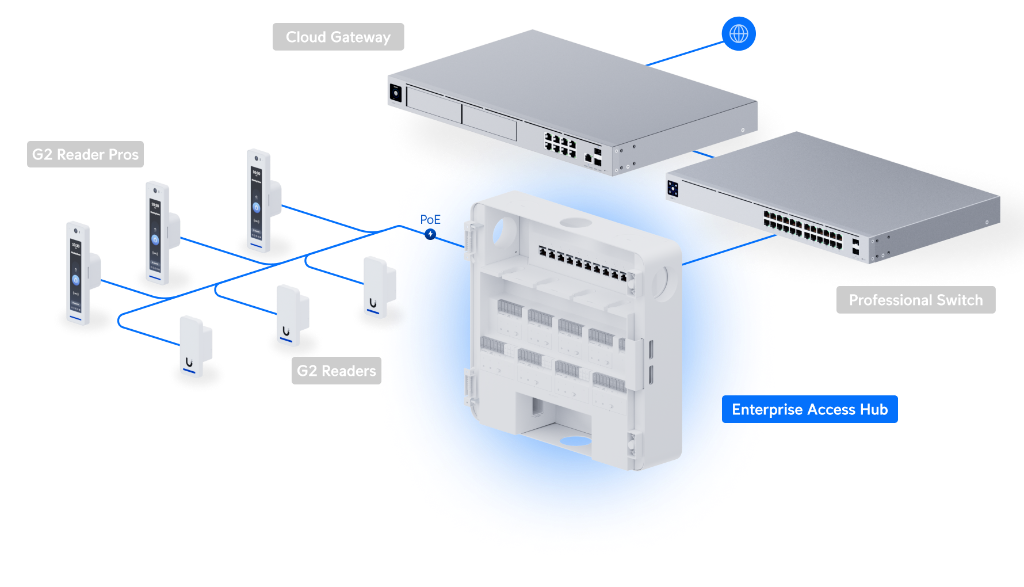
The touchscreen reader at the door, the hub that drives the lock, and staff key fobs.
UniFi Protect G6 Pro Dome
Vandal-resistant dome for entries, corridors and counters.
UniFi Pro Max 48 PoE switch
Powers access points, cameras and readers over one network cable.
UniFi Dream Machine Pro Max
Rack-mount cloud gateway: firewall, dual internet links, failover and VPN for the site.
Product images: Ubiquiti. Example specs from techspecs.ui.com. Exact models are chosen per site after the survey.
See it in action
Every door, every visitor, one app.
Every way in, from one system
Phone, card, PIN, QR code, key fob, intercom and more. Pick the methods that suit each door.
Intercoms that ring the right desk
Visitors call from the entrance and staff answer on a desk screen or phone, then unlock remotely.
Gates and boom gates too
A UniFi reader on a post can open a car park boom gate, managed in the same app as the doors.
Set up each entrance your way
Choose which unlock methods each door accepts, who the doorbell calls, and the logo and name shown on screen.
Visitor self check-in
Visitors scan the QR code from their invitation at a reception tablet to check in.
Access groups for staff, contractors and visitors
Set up policies once for groups such as contractors or out-of-hours staff, then add people to them.
Screenshots supplied by Ubiquiti. Select an image to view it full size.
UniFi Protect: AI video platform
Not a camera system. An AI video intelligence platform.
Edge AI processing on G6 and AI series cameras. Local storage on UniFi NVR or UNVR. Zero per-camera licensing fees. Every detection event - person, vehicle, number plate, glass break, smoke - ties back to the access control log, the alarm system, and the network security console. 2026 physical security best practice: one integrated platform, not siloed systems.
AI Detection Capabilities by Camera Series
Detection Type
G6 / AI Series
G5 / G4 Series
With AI Key
Person Detection
✓
✓
✓
Vehicle Detection
✓
✓
✓
Number Plate Recognition
✓
Via AI Port
✓ Enhanced
Face Recognition
✓
Via AI Port
✓ Enhanced
Clothing Type/Colour
Via AI Key
Via AI Key
✓
Vehicle Type/Colour
✓
Via AI Port
✓
Audio Classification
✓
✓
✓
Speech-to-Text
Via AI Key
Via AI Key
✓
Natural Language Search
Via AI Key
Via AI Key
✓
Alarm Manager
If-this-then-that automations across UniFi and third-party systems. Camera detects motion, loudspeaker plays prerecorded message, siren activates, duty manager gets push notification. All automatic, all logged.
Edge AI Analytics
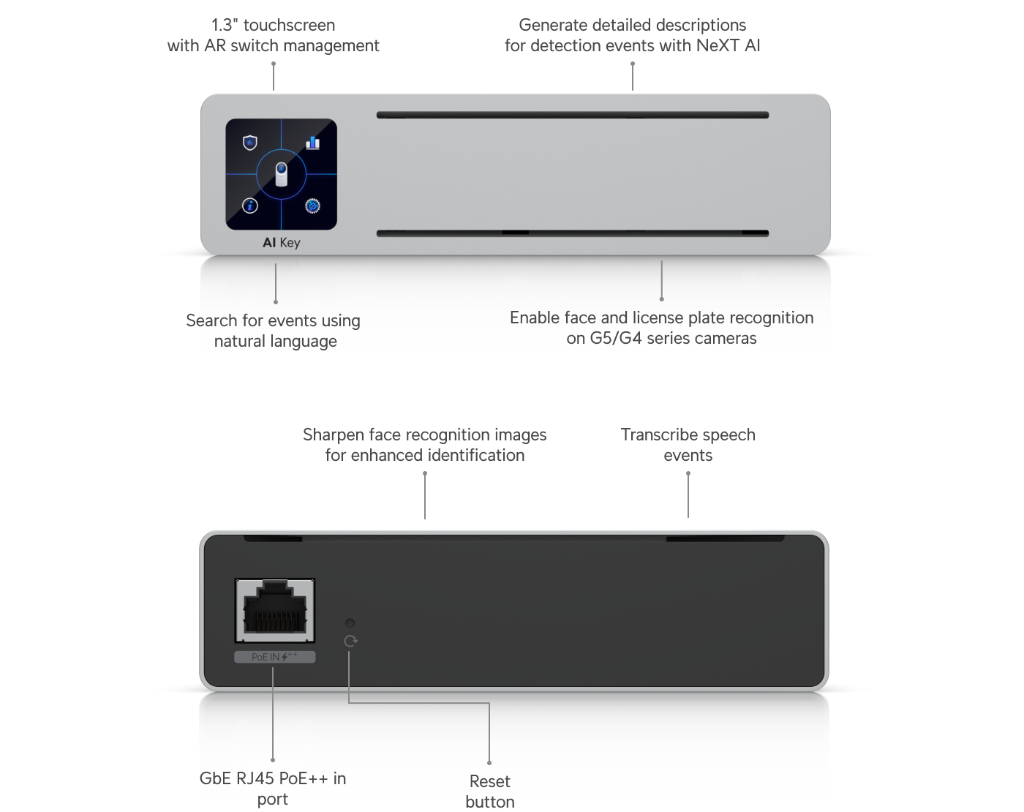
On-camera AI processing for person, vehicle, and number plate detection. Clothing type and colour classification. Gender and accessory detection (backpack, bag). Face recognition with custom labelling. All processed locally - no cloud, no data leaving your building.
Natural Language Search
Find footage by describing what happened. 'Red SUV in car park after 10pm.' 'Person wearing blue jacket near reception.' 'Glass break sound in warehouse.' The AI Key indexes all detections and returns matching clips instantly - no timeline scrubbing.
Video Walls
Multi-site Video Walls native in Site Manager. Unified viewing of camera streams spanning geography. Custom layouts, live feeds, and playback across all locations. Monitor every site from one screen.
Storage Manager
Btrfs filesystem on Enterprise NVR. Expand storage incrementally without reconfiguring. Drive health monitoring with instant failure alerts. Enhanced Retention mode intelligently reduces older footage quality to preserve months or years of critical video.
Incident Case Manager
Build structured incident reports by grouping relevant clips, annotating key moments, and exporting for stakeholders. Link access events, camera footage, and alarm triggers into a single timeline. Share externally or archive for compliance.
Cloud Video Archiving
Simplified bulk export to Google Drive, Dropbox, OneDrive, or local NAS. Automatic offsite redundancy for compliance and disaster recovery. Encrypted transfer, zero licensing fees.
$0
Per-camera licensing. Forever.
Run 4 or 4,000 cameras. AI detections, face recognition, LPR, Smart Detections, Alarm Manager, all included in the hardware price. No subscription. No paid AI add-ons. No cloud storage fees.
Emergency mode
Two modes that override everything.
In an emergency, you do not have time to log into a console. UniFi Access has two hardware-level emergency modes that bypass all policy logic and act instantly across every door on the site. Fire panel integration is hardwired. It cannot be overridden by software.
Evacuation - Fire
Fire panel triggers. Unlock everything.
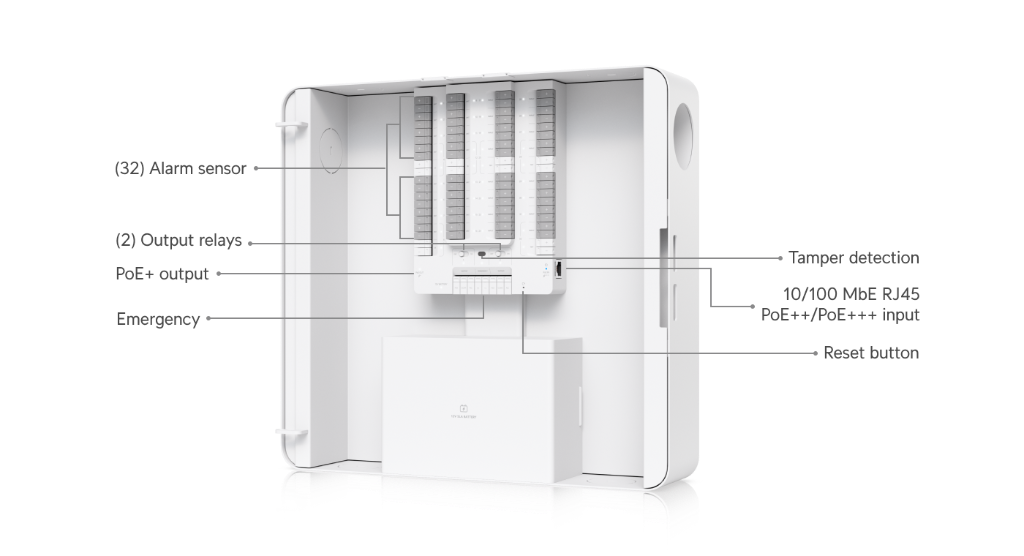
The EWIS or fire panel sends a signal to the EMERGENCY input on the Enterprise Access Hub. Every fail-safe lock releases, satisfying the NCC D3D26 requirement for unimpeded free egress. Fail-safe magnetic locks on fire-isolated exits comply with AS1905.1. The fire panel signal takes hardware priority - it cannot be overridden from software. Lifts return to ground and open. This is not a replacement for your fire safety system. It integrates with it.
Fire Input
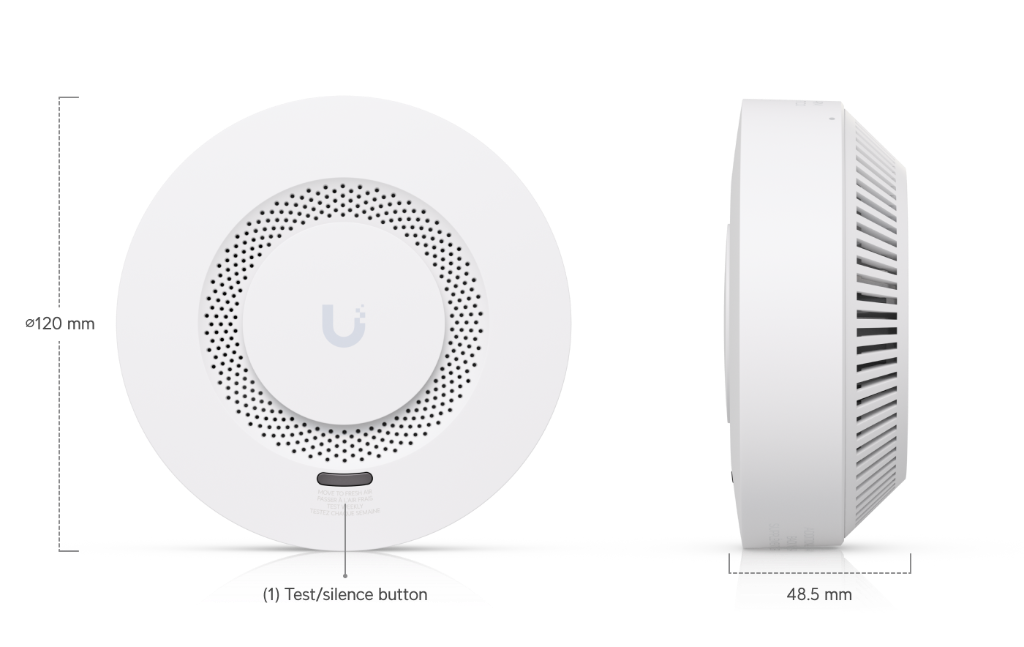
Smoke Detector
Lockdown - Threat
Threat detected. Lock everything.
Triggered manually from the Access app, the mobile app, or a reader with a built-in camera using an admin NFC card or PIN. Every door locks. Credential authentication is overridden. No card, PIN, number plate or phone tap will open any door.
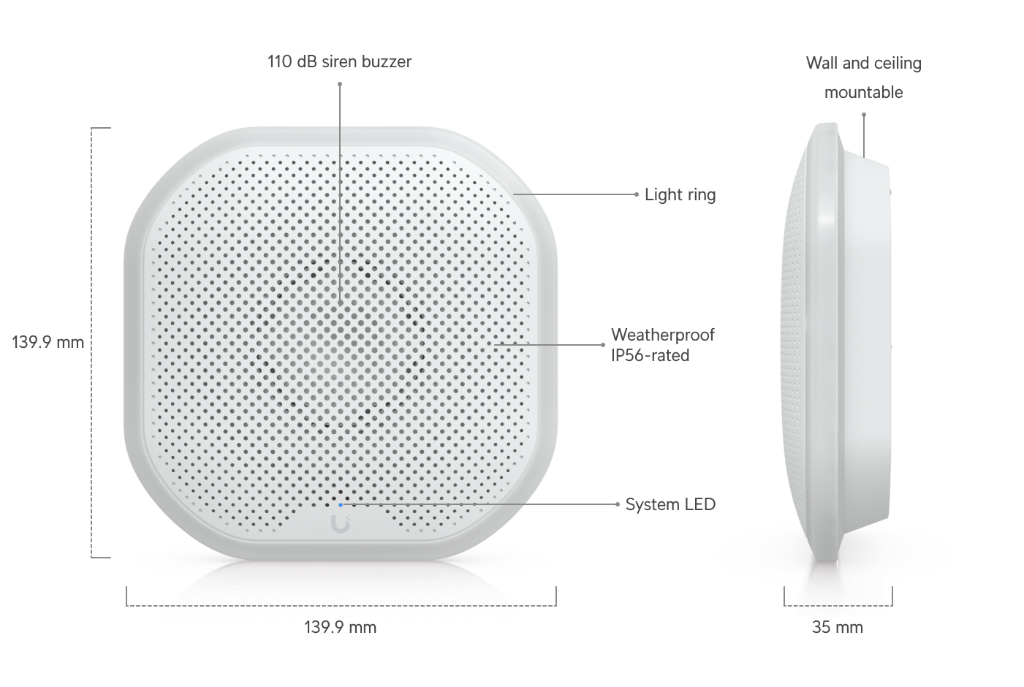
Siren 110 dB
Alarm Hub
The platform
UniFi at a glance
4K AI cameras
Person, vehicle, animal, face and number plate detection on the camera. Clothing colour and natural-language search with the AI Key.
Source: Ubiquiti UniFi deck, 2026
8 doors per hub
Enterprise Access Hub holds 10,000 users. Add hubs to scale.
Source: techspecs.ui.com, EAH-8, 2026
1,000 sites
SD-WAN hub and spoke, with every site in one Site Manager view.
Source: Ubiquiti UniFi deck, 2026
Why it holds up
Hardware, support and cover behind every install.
Built not to fall over
Business-grade UniFi hardware supports backup internet links, spare power supplies and fans that can be swapped while it runs, so one failed part does not take the site down.
Ubiquiti behind our engineers
Ubiquiti offers paid 24/7 phone support plans for UniFi, so hard hardware problems can be escalated to the people who make it.
Up to five years of hardware cover
Ubiquiti's UI Care plans cover hardware for up to five years, with replacements shipped before the faulty unit goes back.
Source: Ubiquiti, UniFi overview, 2026.
Intercom to desk
Visitors at the door ring a UniFi Talk desk phone.
UniFi Talk handsets
Desk and cordless phones on your network, connected to an Australian SIP trunk.
G3 Reader Pro, hubs and fobs
The touchscreen reader at the door, the hub that drives the lock, and staff key fobs.
Product images: Ubiquiti. Example specs from techspecs.ui.com. Exact models are chosen per site after the survey.
The process
From site walk to managed service.
We do not drop-ship hardware. Every deployment follows the same five-step process. We walk the site, we design the topology, we stage the hardware, we install it, and then we stay. All work is performed by licensed cablers and locksmiths. Fire safety compliance is verified before handover. Documentation packs include as-built floorplans, VLAN diagrams, and compliance certificates.
Day 1-5
01
Site assessment
We walk your building, review your floorplan, and assess existing cabling, locks, and access infrastructure. We produce a topology design with hardware selection, VLAN plan, and a fixed-price proposal.
Camera placement on floorplan
Door reader and hub locations
VLAN design - IT, cameras, access, alarms
PoE budget and switch selection
Fixed-price proposal
Day 5-15
02
Procurement & staging
We order hardware through our distribution channels, stage it in our workshop, pre-configure the gateway, adopt devices, and label everything. When we arrive on site, the system is half-built before the first cable is run.
Hardware procurement
Gateway pre-configuration
Device adoption and firmware updates
Cable labelling and loom preparation
Day 15-30
03
Installation & commissioning
Our licensed cablers run Cat 6 to every device location. Locksmiths install strikes and magnetic locks. We mount readers, cameras, sensors, and hubs. Then we commission, test every door, calibrate every camera, configure every policy.
Cat 6 cable runs to all locations
Lock and strike installation
Reader, camera, sensor mounting
Door-by-door commissioning
Access policy configuration per role
Day 30-35
04
Handover & training
We hand over a fully documented system. Your team gets training on the console, adding users, creating policies, reviewing event logs, running visitor management, and triggering emergency modes.
As-built documentation pack
Console training for admin staff
Reception kiosk and visitor flow training
Emergency protocol run-through
Ongoing
05
Managed service
Monthly firmware management, access schedule reviews, camera health monitoring, alarm test cycles, and remote incident response. We stay accountable after installation. One phone number for the whole stack.
Monthly firmware updates
Access schedule reviews
Camera health monitoring
Quarterly alarm test cycles
Remote incident response
Ready to start?Book a site assessment →
Case study
From four vendors to one.
A two-storey commercial tenancy in Fortitude Valley. This is what happens when you replace a patchwork with a single UniFi OS deployment. The existing fire panel, EWIS, and building infrastructure remained - we integrated around them. No rip-and-replace. No voided warranties. No compliance gaps.
The building
Two floors of commercial tenancies above a basement car park in Fortitude Valley. Ground floor reception with visitor management. Level 1 open-plan office with 45 workstations. The site had a legacy swipe card system from 2016 that dropped offline weekly, a 16-channel DVR recording to a failing hard drive, an alarm panel with a dead battery, and a paper visitor book at reception.
The problem
The swipe card system went offline every week - usually Monday morning. The DVR had not been checked in six months; the hard drive was full and stopped recording. The alarm panel had a dead battery no one noticed until it started false-tripping at 2am. The visitor book was a liability: no audit trail, no verification, no integration. The building manager fielded complaints about doors that would not open, cameras that did not record, and alarms that went off for no reason. Four vendors, four invoices, zero accountability.
What we did
We walked the site on a Tuesday. By Friday we had a topology design, hardware list, and fixed-price proposal. Two weeks later the hardware was staged in our workshop - gateway configured, devices adopted, firmware updated, cables labelled. Installation took three days: two licensed cablers, a locksmith, and our engineer. We ran Cat 6 to every reader, camera, and sensor. We replaced the old magnetic locks with UL 294-certified strikes. We integrated the existing fire panel and EWIS - no rip-and-replace.
The result
Every door, every camera, and every alarm on one console. Staff tap their phone on the reader - Touch Pass, no app, no fob. The car park reads number plates and opens the boom gate. Visitors check in with a QR code that auto-revokes at 5pm. The lift enforces floor-level policy. When the fire panel was tested, every fail-safe lock released in under one second. The building manager has one phone number. The four vendor invoices are gone.
1
Unified console
4→1
Vendors consolidated
$0
Licensing fees
100%
On-site storage
NCC
D3D26 compliant
Deployed hardware
All UniFi Access and Protect devices. Zero third-party licensing.
G3 Readers
8 doors
G6 Cameras
24 streams
EAH-8 Hubs
2 units
UNVR Pro
16TB storage
Security & Compliance
Enterprise-grade security. Without replacing your compliance obligations.
UniFi Access is not a consumer product repackaged for business. Every Access Control Hub and Reader is UL 294-certified by Eurofins MET Labs, an OSHA-accredited Nationally Recognised Testing Laboratory. Communication between hubs and readers is encrypted with 128-bit NaCl. NFC cards and keyfobs use multi-layer AES-128 and ECDSA encryption to prevent duplication. Credentials are cached locally on the hub, so doors keep working when the network is down. When power drops, battery backup keeps the system running. When the console comes back online, everything resyncs automatically. This platform enhances your existing security framework. It does not replace your NCC, AS1905.1, or fire safety obligations.
UL 294 certified
All UniFi Access Control Hubs and Readers are UL 294-certified by Eurofins MET Labs (an OSHA NRTL). UL 294 is a North American standard. We confirm which certifications your consultant or insurer needs before we specify hardware.
128-bit NaCl encryption
Secure communication between Access Control Hubs and Readers uses 128-bit NaCl encryption to prevent data interception, with AES-128 encrypted requests for tamper-proof transmissions.
PoE-based architecture
PoE eliminates proprietary power and communication wiring. Readers connect directly to hubs over a secure, encrypted network connection - no separate power cables, no exposed conductors.
Power redundancy
The Mission Critical switch provides battery-backed power to hubs during outages. The EAH-8 supports an external 32-48V DC lead-acid backup battery for continuous operation when mains drops.
Offline credential cache
Access credentials are stored locally on the Access Control Hub. If the console goes offline or loses internet, users can still unlock doors using already-synced NFC cards, face data, QR codes and PINs.
Automatic resync
When the hub reconnects to the console, all pending updates - unlock events and new credentials - sync automatically. No manual intervention, no lost events, no gaps in the audit trail.
Lock types - fail-safe vs fail-secure
Two lock philosophies. Two use cases.
The NCC (Building Code of Australia) and AS1905.1 determine which lock type is legal for which door, not the installer preference. Fire-isolated exits, fire-isolated stairways, and all NCC D3D26 exit paths must use fail-safe locks wired to the fire panel or EWIS. Fail-secure locks are only permitted on internal secure doors that are not part of any egress path. We design lock type per door based on the building fire safety plan, the BCA classification, and council fire safety certificate requirements. UniFi Access integrates with your existing fire panel and EWIS. It does not replace them.
🔓
Fail-safe locks
Release on power loss. Required by NCC D3D26 on all fire-isolated exits, fire-isolated stairways, and emergency egress paths - AS1905.1 mandates that electric locks on fire doors must release on activation of the EWIS or fire panel. When the fire panel triggers the EMERGENCY input on the EAH-8, the relay drops power and every magnetic lock releases instantly.
🔒
Fail-secure locks
Stay locked on power loss. Permitted on internal secure doors - server rooms, medication dispensaries, cash rooms. Must NOT be installed on any NCC D3D26 exit door, fire door, or path-of-travel door. Requires manual override (rescue keyswitch) or admin remote unlock for emergency access.
Protect integration - events with footage
Every access event. Automatically linked to camera footage.
When a door unlocks, the nearest UniFi Protect camera records the event. The access event log and the camera clip are automatically correlated. No manual searching, no timestamp matching. Click an access event in the console and the footage plays. Door position sensors detect forced entries and door-held-open conditions, triggering instant alerts to administrators. Every event is time-stamped, user-attributed, and video-backed. The audit trail writes itself.
Door unlock events
Auto-linked to camera clips
Forced entry alerts
Instant push notification
Door held open
Configurable timeout alert
After-hours access
Flagged and logged
Event correlation
07:23 - Sarah Chen - G3 SK Pro Reader - L2 Office
NFC card · Door opened 2.1s · Closed 4.3s
14:07 - Unknown visitor - Reception Kiosk
QR code scan · Photo captured · Approved by reception
18:34 - Door held open - L2 East exit
Held 47s · Alert sent to duty manager · Camera clip attached
Every event time-stamped, user-attributed, and video-backed. The audit trail writes itself.
Australian Standards
Compliance with Australian standards. Building access, fire safety, and electrical safety.
All UniFi Access and Protect hardware supplied by Real Bytes complies with applicable Australian standards. Lock hardware is tested to AS4145.2-2008 for mechanical locksets. Smoke alarms meet AS3786-2014. Electrical installations must be performed by a licensed electrician under AS/NZS3000:2018 (Wiring Rules). This section provides compliance information, installation requirements, and safety procedures.
Table of Contents
AS4145.2-2008
Mechanical locksets and hardware for doors in buildings. The Australian standard for lock security grading. We check the rating of each lock against your door and insurer requirements.
Lock HardwareSecurity Grading
AS3786-2014
Smoke alarms using scattered light, transmitted light or ionisation. UniFi USL-Smoke detectors comply with this standard.. For commercial buildings (Class 2 to 9), NCC Specification 20 requires a full automatic fire detection and alarm system (AFAS) connected to the EWIS, individual AS3786-compliant detectors are the field devices within that system.
Smoke DetectionPhotoelectric
Other Applicable Standards
AS/NZS3000:2018
Wiring Rules
Electrical installations, all PoE and low-voltage wiring must comply.
NCC D3D26 / BCA
Exit door egress
Single-action egress, no key on egress side, fail-safe locks mandatory on fire-isolated exits.
AS1905.1
Fire door hardware
All locks on fire doors must be fire-rated and release on EWIS/fire panel activation.
AS/NZS 60335.2.103
Automated gate motors
Force limiting and entrapment protection (PE beams) mandatory on all automated vehicle gates.
Australian Standards Compliance
For commercial buildings (Class 2 to 9), NCC 2022 Specification 20 requires a full automatic fire detection and alarm system (AFAS). Smoke detectors within that system must comply with AS3786-2014. The AFAS must be connected to the EWIS (Emergency Warning and Intercommunication System) and the building's fire panel, which in turn triggers fail-safe lock release via the EAH-8 EMERGENCY input.
AS3786-2014NCC 2022 Spec. 20EWIS
Door Hardware Standards
Electric locks and mechanical locksets in Australia must comply with AS4145.2-2008 for security grading. We confirm the grade of each lock against the hardware chosen for your doors. Fail-safe locks on fire-isolated exits and fire doors must comply with AS1905.1 and be wired to the fire panel or EWIS to release on alarm. NCC D3D26 prohibits key locking on the egress side of exit doors and requires single-action egress. All automated vehicle gates must comply with AS/NZS 60335.2.103 (force limiting + entrapment protection).
Documentation
UniFi Help Center. Official documentation and guides.
Access official UniFi documentation, installation guides, and technical specifications. All hardware is backed by Ubiquiti's thorough help portal and community support.
Can UniFi Access replace a traditional access control system?
Often, yes. UniFi Access handles cards, PINs and phone unlock, staff schedules and entry logs from one app, with no per-door licence fees. Whether it can replace your current system depends on your existing locks, doors and fire requirements, which we check during the site survey.
Does UniFi Access need professional installation?
For commercial buildings, yes. Door access involves lock hardware, safe exit when the power or network fails, and connection to fire systems, which must be done correctly by qualified installers. We survey every door, install the hardware and document how each one behaves in an emergency.
Can UniFi Access work with security cameras?
Yes. UniFi Access and UniFi Protect share one app, so every door entry can be checked against the camera footage at that door. It is one system to manage instead of separate access control and CCTV suppliers.
Common questions
Door access: common questions.
Are there licence fees for UniFi Access doors?
No. UniFi Access has no per-door licence fee. You buy the readers and hubs once, and doors, schedules and entry logs are managed in the same app as your network and cameras. Optional add-ons such as Identity Enterprise and UI Care are paid extras.
Can you take over a UniFi Access system someone else installed?
Yes. We review what is there, tidy up the settings and document each door, including how it behaves in an emergency. We then support it as part of your managed IT.
Do you install door access outside Brisbane?
Yes. Our engineers are Brisbane-based, and we have people and partners for installs in Sydney, Melbourne, Adelaide and Albury. Anywhere else in Australia, we can support an existing UniFi system remotely.
Next step
Ready to upgrade your building security?
Tell us about your doors, cameras and alarms, and an engineer will design a UniFi Access system for your site.

 Remote Support