
 Remote
Managed detection and response (MDR)
Managed detection and response, for the 2am sign-in
For owners and office managers who want someone to notice when a stolen password gets used overnight. Software watches your computers and Microsoft 365 sign-ins 24/7, security analysts act on what's real, and one of our engineers calls you in the morning to explain and finish the clean-up.
Replay the 2am sign-in- 2:07 am
- Sign-in to Microsoft 365 as Jo, office manager
- Where
- Overseas, on a device never seen before
- Flagged by
- Sign-in monitoring
- Analyst
- Confirmed it isn't Jo
Account suspended. Every session signed out.
Next: our engineer calls you at the start of business.
2:07 am: someone signs in as your office manager
Here is one night, step by step: what happened, who acted, and what you would actually see. Most of it happens while you sleep, which is the point.
Illustrative scenario, based on situations we see often. Not a single client.
Someone signs in as your office manager
They use a password and session stolen on a fake Microsoft sign-in page earlier in the week. To Microsoft 365 it looks like Jo, just from another country, on a device nobody has seen before.
Who actedSign-in monitoring flags the unusual place and the new device.
What you seeNothing. You're asleep.
- Moments later
The attacker starts setting up a hidden inbox rule
Microsoft notes that attackers set rules that move messages with words like "invoice" out of sight, or forward them to an outside address, so replies don't give them away.4
Who actedThe warning signs stack up on the same account: new place, new device, a new mailbox rule.
What you seeNothing yet.
- Overnight
A security analyst checks it
A person in the Guardz security team looks at the alert. Guardz runs a follow-the-sun team, with analysts in North America, Europe and Asia-Pacific, so someone is awake at 2am in Australia.1
Who actedSecurity analyst, 24/7.
What you seeStill nothing. You don't get a 2am phone call for an account that's already contained.
- As soon as it's confirmed
The account is suspended and the attacker is signed outContained
Under the response rules we agree with you when we set you up, the analyst suspends the account, which stops anyone signing in to it. If a computer were involved, it could be cut off from the network while it stays switched on, so nothing is lost.1
Who actedSecurity analyst, under rules you agreed in advance.
What you seeJo can't sign in when she wakes up. That's on purpose, until we've checked everything.
- Tuesday, start of business
One of our engineers calls you
We explain what happened in plain words, then finish the job: reset the password, re-register Jo's sign-in methods, remove the hidden rule and any forwarding to outside addresses, and check what was read.3
Who actedOur engineer, in business hours.
What you seeA phone call, and a job in your portal with the story already written up.
- Once it's clean
Jo is back at work
Her sign-in is restored, on a phishing-resistant method such as a passkey where her device supports it, and we check the other accounts that were in the same email threads.
Who actedOur engineer.
What you seeYour office manager back in her inbox, and a short note to staff about what to look out for.
- Within 30 days
The paperwork, if personal information was involved
If the mailbox held personal information and your business is covered by the Privacy Act, you have 30 days to assess whether it's an eligible data breach.6 We give you a written account of what happened and what was touched, for that assessment and for your insurer.
Who actedOur engineer, with you.
What you seeA written incident account you can hand to your insurer or adviser.
Software flags it. A person decides. One of our people explains and fixes.
See what MDR is, in plain EnglishMDR in plain English: what watches, who acts, what you see
Managed detection and response means software watches your computers and accounts for signs of an attack, and trained people act on what it finds, day and night. You get the outcome, not a screen of alerts.
Your computers and Microsoft 365
Laptops, desktops, servers, and the sign-ins to email, files and Teams.
Software watches
An agent on every computer, and sign-in monitoring on every account.
Security analysts, 24/7
Confirm what's real. Suspend the account or cut the computer off.
Our engineers, business hours
Clean up, explain, and close the gap that let it happen.
You
A phone call, a job in your portal, and a written account.
About one in five Australian businesses (21%) reported a cyber security incident in 2024-25.8
What watches
- SentinelOne on every computer, through Guardz. Some clients are on Huntress.
- Sign-in monitoring on Microsoft 365 accounts: unusual places, new devices, risky sign-ins.
- Microsoft Defender for Business, which comes with Business Premium for organisations of up to 300 users.9
Who acts
- Security analysts, around the clock, inside the response rules we agree with you.
- Our engineers in business hours, who know your setup and finish the clean-up.
- After hours, Chip logs any call and the on-call engineer is called for urgent P0 and P1 issues, best effort.
What you see
- Nothing at 2am, if it's already contained.
- A call from one of our engineers, in plain words.
- A written account of what happened and what was touched, for your insurer or a breach assessment.
The jargon, defined once
- EDR (endpoint detection and response)
- Software on each computer that watches what programs do, not just which files they are, and can cut the computer off from the network.
- ITDR (identity threat detection and response)
- Monitoring of sign-ins and accounts, so a stolen password used from somewhere odd is caught.
- SOC (security operations centre)
- The team of analysts who watch the alerts. For most of our clients it's the Guardz team, around the clock.
- MDR (managed detection and response)
- EDR and ITDR plus the people who watch them and act. The "managed" part is the people.
- Isolate
- Cut a computer off from the network while it stays on, so an attack can't spread and evidence isn't lost.
- Suspend
- Stop anyone signing in to an account until it has been checked.
What MDR isn't
It isn't antivirus. Antivirus looks for known bad files. Most attackers now sign in with a stolen password and use tools already on your computers, so there's often no bad file to find.
It isn't a 24/7 help desk. Monitoring runs 24/7. Our engineers answer in business hours, and after hours the on-call engineer is called for urgent issues, best effort.
How long would nobody be watching?
Pick when an attacker signs in and who watches your systems today. You'll see how long it would be before a person looks at the alert.
Business hours here means 8 am to 5 pm, Monday to Friday, with someone actually looking at alerts. Public holidays aren't counted, so a long weekend is longer still.
Before a person looks at the alert
61 hours
61 hours before anyone looks
That's how long an attacker would have inside the account before the next working day starts. Long enough to read the mailbox and set up a fake invoice.
An attacker signs in on Friday at 7 pm. 61 hours before anyone looks. That's how long an attacker would have inside the account before the next working day starts. Long enough to read the mailbox and set up a fake invoice.
ASD received more than 82,000 cybercrime reports in 2025-26, about one every 6 minutes.2
Your answers stay in your browser. Nothing is saved or sent.
With the starting answers (Friday at 7 pm, someone watching in business hours), nobody would look at the alert for 61 hours, until 8 am on Monday. With 24/7 monitoring it's checked as it happens.
See which parts of your setup are watched 24/7Six layers of protection, and which ones are watched 24/7
MDR is one part of a layered setup. Each layer catches what the one before missed. Open a layer to see what it stops, what we use, and whether it's watched around the clock or checked by our engineers in business hours.
Six layers around your business, marked by who watches. Solid line: watched 24/7. Dashed: automatic, checked by our engineers. Dotted: your people.
PeopleYour people, with our helpThe odd request gets a second look.
Short security awareness training, practice phishing emails, and a call-back habit for any change to bank details.
What we use: Training and phishing simulations, on every plan.
Who acts: Staff report the odd email. Our help desk checks it, including suspicious bank-detail emails.
EmailAutomatic, checked by our engineersMost phishing and fake invoices stopped before the inbox.
Filtering on top of Microsoft 365, link and attachment checks, and alerts when someone creates an inbox rule that hides, deletes or forwards mail.
What we use: Check Point email security, and Microsoft 365 alerts.
Who acts: Filtering runs around the clock. Held mail and new inbox rule alerts are checked by one of our engineers.
Sign-insWatched 24/7A stolen password alone isn't enough to get in.
A second sign-in step for everyone, rules that block risky sign-ins, and separate admin accounts used only for admin work.
What we use: Microsoft Entra ID, with identity threat detection from Guardz.
Who acts: Watched 24/7. An analyst suspends the account if a sign-in is confirmed as an attack.
NetworkAutomatic, checked by our engineersKnown bad traffic kept out, guests kept away from your files.
A gateway with threat detection, with staff, guest and device networks kept apart. Firmware updated on a schedule and the configuration backed up off the device.
What we use: Ubiquiti UniFi, where we look after your network.
Who acts: Blocking is automatic. Our engineers review the alerts.
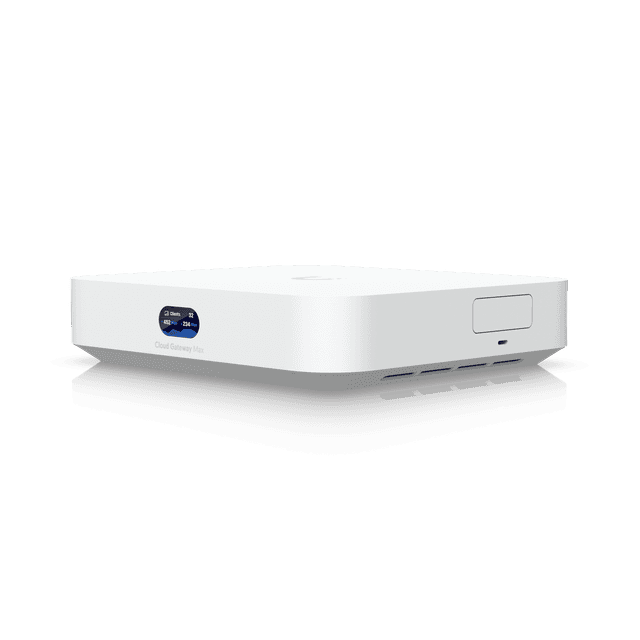
Product image: Ubiquiti. UniFi Cloud Gateway Max, a small office gateway. UniFi is a trademark of Ubiquiti Inc.
ComputersWatched 24/7Ransomware and malware stopped, and an attacked computer cut off.
Endpoint detection and response on every computer, plus patching in the background.
What we use: Guardz with SentinelOne, and Huntress for some clients. Patching through ConnectWise.
Who acts: Watched 24/7. The analyst isolates the computer; our engineers clean it up and tell you what happened.
BackupsAutomatic, checked by our engineersYou can recover, even if the worst happens.
Microsoft 365 mail, files and Teams backed up to storage that can't be changed or deleted, even by an attacker with admin access, with scheduled restore tests.
What we use: Immutable cloud backup, on every plan.
Who acts: Backups run automatically. Our engineers check them and run the test restores.
Two layers are watched by people 24/7. The rest are automatic, with our engineers checking what they flag. Nobody can honestly promise more than that.
What it looks like for owners, office managers and IT people
Same monitoring, different worries. Pick yours.
If something happened overnight, would anyone even know?
Illustrative scenario, based on situations we see often. Not a single client.
A director's laptop started running an unfamiliar program late on a Sunday. SentinelOne flagged it, an analyst confirmed it, and the laptop was cut off from the network while it stayed on. On Monday morning our engineer rang, explained it in two minutes, and had a clean laptop back with the director by lunchtime.
You hear about it as a problem solved, not a problem starting.
What we do
- 24/7 monitoring on every computer and Microsoft 365 account
- A call from one of our engineers who knows your setup
- A written account you can hand to your insurer
Staff keep asking me about weird sign-in prompts. What do I tell them?
Illustrative scenario, based on situations we see often. Not a single client.
A staff member got a Microsoft sign-in prompt they hadn't asked for. They tapped deny and forwarded a screenshot to the help desk. Our engineer checked the sign-ins, found someone had their password, reset it and turned on a stronger sign-in method, all before lunch.
You stop being the security desk. You just forward it to us.
What we do
- One place to send anything odd: your portal, email or Chip in Teams
- Our help desk checks it, including suspicious bank-detail emails
- Plain answers you can pass on to staff
I need nights and weekends covered, not someone going around me.
Illustrative scenario, based on situations we see often. Not a single client.
Alerts used to land in a shared inbox nobody watched after five. Now they're watched 24/7, and the ones that matter become a job with the story already written. The internal IT lead still runs the network and the projects.
Nights and weekends back, and nobody touching your systems without you knowing.
What we do
- 24/7 monitoring on top of what you already run
- Who does what, agreed in writing
- You see every incident job, start to finish
Check us before you trust us with your nights
An MDR provider can suspend your accounts and cut off your computers. Here is how to check us, and the questions worth asking any provider.
- SMB1001 Diamond
- Independently audited by BSI. Search Real Bytes on CyberCert Verify.7
- ASD Network Partner
- We're part of the Australian Signals Directorate's partner network.
- 4.8 from 40+ Google reviews
- Read them on our client success page.
- Since 2013
- In business since 2013, with Real Bytes as it is today formed in 2017.
Questions to ask any MDR provider, and our answers
Who actually acts at 2am, and what are they allowed to do?
Security analysts in the Guardz team, 24/7. They can suspend an account or isolate a computer, inside response rules we agree with you at setup.1
Who cleans up afterwards?
Our engineers, the same people who look after your IT. We finish the job and explain it.
What don't you watch?
Computers without our agent on them, personal phones that aren't enrolled, and systems we don't manage. We list them with you at setup.
What do I get in writing?
A written account of each incident: what happened, what was touched and what we did.
Will you tell me if your own business has a security incident?
Yes, in writing. Each of our engineers also uses their own named admin account with MFA, so every change is traceable.
Our stack: Guardz with SentinelOne, Huntress, Check Point, Microsoft, Ubiquiti UniFi, ConnectWise, Pax8. We also support, when a client already has them: CrowdStrike, Sophos, Fortinet, Meraki, Veeam.
Some of the people who'll call you in the morning
 Philip VernerDirector
 Blake BathGeneral Manager
 Mason WiseMSP Practice Lead
 Mitchell MorganAutomation & Platform Lead
 Travis JacobOperations Manager
 Bill Nobbs-O'BrienService Desk & Field Engineer
Photos: Real Bytes. Meet our engineers
What MDR can't do, and what we need from you
Nobody can honestly promise you'll never have an incident. Here is where monitoring stops, and the four things that make it work.
What it can't do
- Watch a computer that doesn't have the agent on it, or a personal phone that isn't enrolled.
- Stop a payment someone makes to a fake account. A call-back habit for bank changes does that.
- Replace backups. If something is deleted or encrypted, the backup is how it comes back.
- Turn our help desk into a 24/7 one. Our engineers answer in business hours, Monday to Friday. After hours, Chip, our AI receptionist, answers and logs the request, and the on-call engineer is called for urgent P0 and P1 issues, best effort. Security monitoring runs 24/7.
What we need from you
- Our agent on every computer, including laptops that live at home.
- A second sign-in step for everyone, including the boss.
- Response rules agreed up front: who we can suspend without calling first.
- A heads-up when someone starts, leaves or gets a new computer.
Questions people ask about managed detection and response
How is MDR different from antivirus?
Antivirus looks for known bad files. Most attackers now sign in with a stolen password and use normal tools already on your computers, so there's often no bad file to find. MDR watches behaviour instead, like a sign-in from overseas or a laptop suddenly encrypting files, and people check what the software finds.
What do you watch?
Your laptops, desktops and servers, through an agent on each one, and the sign-ins to your Microsoft 365 email, files and Teams. Watching accounts matters as much as watching computers, because a stolen Microsoft 365 password is one of the most common ways in.
What happens at 2am on a Sunday?
A security analyst checks the alert, and if it's real the account is suspended or the computer cut off from the network, inside the response rules we've agreed with you. Our engineers answer in business hours, Monday to Friday. After hours, Chip, our AI receptionist, answers and logs the request, and the on-call engineer is called for urgent P0 and P1 issues, best effort. Security monitoring runs 24/7. One of our engineers calls you at the start of business.
Which platform do you use?
Guardz runs our managed detection and response, with SentinelOne on your computers and a follow-the-sun team of analysts in North America, Europe and Asia-Pacific.1 Some clients are on Huntress. Microsoft 365 Business Premium also includes Microsoft Defender for Business.9
Will you lock out the boss without asking?
Only if you've told us to. At setup we agree the response rules: which accounts and computers the analysts can suspend or isolate straight away, and which need a call first. We recommend "contain first, call me after", because a few hours of lost access costs far less than a stolen mailbox.
We're too small to be a target, aren't we?
One in three Australian small businesses think so, according to auDA's 2026 survey.5 ASD's figures say otherwise: small businesses reported an average of $55,400 per cybercrime report in 2025-26.2 Stolen passwords don't check your size first.
How fast do you respond?
Security monitoring runs 24/7 and analysts act as soon as a threat is confirmed. For everything else, our response targets are: On Advantage, Ultimate and RealBytes One, in business hours: P0 within 1 hour, P1 within 2 hours, P2 within 4 business hours. After hours is best effort.
Does it help with cyber insurance?
Yes. Insurers ask whether computers are monitored and who responds. We help you answer the questionnaire accurately, and the written incident accounts back up what you tell them.
We already have an IT person. Do we still need this?
Often, yes, because one person can't watch alerts at 2am. We add 24/7 monitoring on top of what they do and agree who does what in writing, so they stay in charge. Read about co-managed IT.
How much does it cost?
24/7 managed detection and response is part of every Real Bytes plan, Flex included, and every plan carries the same security services. Plans start at A$150 a person a month ex GST, with Microsoft 365 Business Premium included. Every plan, and what is in and out of each, is on our Pricing page.
Who would notice if someone signed in as you tonight?
Tell us what you run today. We'll show you what's watched, what isn't, and what we'd change first. You'll leave with at least one thing you can fix yourself.
Three months, then month to month on 60 days' notice. No exit fees. Onboarding is quoted before you commit.
Already a client? Log a job in your portal or email helpdesk@realbytes.com.au.
What happens next
- You pick a time that suits you.
- One of our engineers calls you. It takes 30 minutes and it's free. There's no slide deck.
- If we can help, we send a written plan. If we can't, we'll tell you who can.
- Nothing happens until you say yes.
Want the bigger picture? See cyber security for Australian businesses, how we protect sign-ins, and backup and disaster recovery.
Sources
Figures and sources checked 22 November 2026. The small numbers on this page link here.
- Guardz, MDR services. Guardz support article: follow-the-sun analysts, response actions and customer-defined response policies, read 22 November 2026
- Australian Government, business.gov.au: Annual Cyber Threat Report 2025-26. Summarising ASD's Annual Cyber Threat Report 2025-26, 28 October 2026
- Microsoft Learn, Respond to a compromised cloud email account. Microsoft, read 22 November 2026
- Microsoft Learn, Alert classification for suspicious inbox manipulation rules. Microsoft, read 22 November 2026
- auDA, Too small to be a target: new report on small business cyber security. auDA, 13 July 2026, survey of 408 small businesses
- Federal Register of Legislation, Privacy Act 1988, section 26WH. Compilation of 4 June 2026
- CyberCert Verify. Search Real Bytes to check our SMB1001 certificate
- Australian Bureau of Statistics, Characteristics of Australian Business, 2024-25. ABS, 25 June 2026
- Microsoft Learn, Microsoft Defender for Business overview. Microsoft, read 22 November 2026