
 Remote
UniFi Enterprise Partner
Your network, cameras, doors and phones in one app, from the Ubiquiti installer Brisbane businesses call.
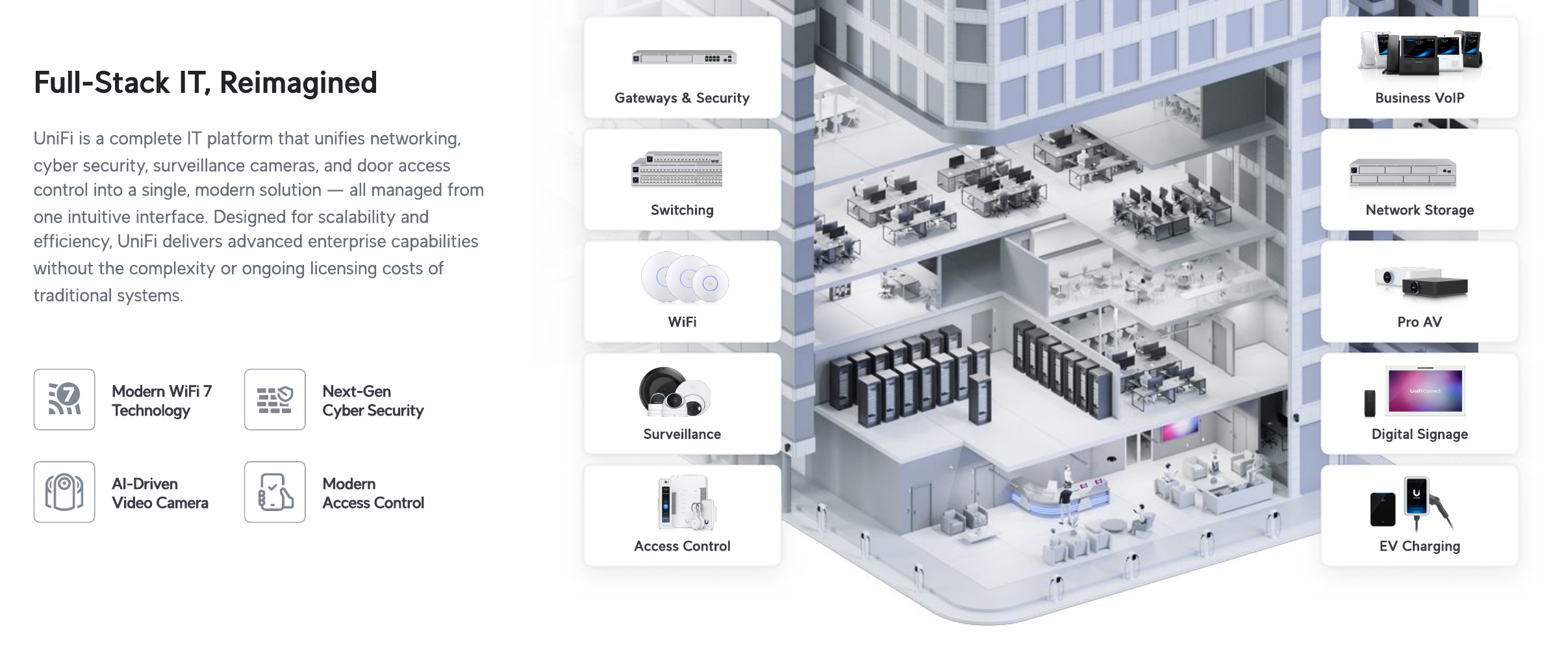
Real Bytes is a UniFi Enterprise Partner with Ubiquiti-certified engineers. We design, supply, install and support the whole UniFi platform: network and Wi-Fi 7, Protect cameras, Access doors, Talk phones and Connect displays, from a single office to multi-site and campus networks across Australia.
Bought through authorised Australian distribution, with UI Care hardware cover on everything we supply. Need a Ubiquiti installer Brisbane offices can meet on site? That's us, and we support sites across Australia too.
- Certified URSCA, UFSP and UWA
- UI Care on everything we supply
- Design to managed support
Reviewed by Blake Bath, General Manager, on 31 October 2026.
What we do with UniFi
The whole UniFi platform, not just the Wi-Fi.
Each part has its own page. They all run in the same app.
Network and Wi-Fi 7
Gateways, switching and Wi-Fi 7 designed from a survey.
- Gateways
- Switching
- Wi-Fi 7
Protect cameras
AI cameras recording on site, no per-camera licence.
- G6 cameras
- Local NVR
- Smart search
Access doors
Cards, PINs and phone unlock, in the same app.
- Readers
- Hubs
- Schedules
Talk and Connect
Desk phones and screens on the same network.
- Talk phones
- Displays
- Signage
UniFi stack picker
Which UniFi pieces do you need?
Tell us the job. We'll point you at the parts and the pages.
Pick what you need and the size of the job. You get the UniFi pieces that fit, and where to read more.
Your UniFi setup
2 parts, one app
- A UniFi gateway, switches and Wi-Fi 7 access points, planned from a site survey. More
- UniFi Protect cameras recording to a UniFi NVR on site, with no per-camera licence. More
- The core software has no per-device licence. Optional paid extras include CyberSecure threat feeds and UI Care hardware cover.
Why us
A Ubiquiti installer Brisbane can rely on: certified engineers, a direct supply line and cover on everything.
- UniFi Enterprise PartnerPart of Ubiquiti's channel for enterprise UniFi products.
- Supply through LeaderAuthorised Australian distribution, in Leader's Elite Integrator Program, which extends warranty on eligible gear to 3 years.
- UI Care on everything we supplyAdvance replacement for up to five years, so a new unit ships before the faulty one goes back.
- Replacements from BrisbaneWe deal with Leader directly on returns, and they hold replacement stock in Brisbane.


From our jobs
Where our UniFi is running.
- Enterprise gateways in productionEnterprise Fortress Gateways at client sites in Brisbane and up the Queensland coast.
- A Defence-certified engineering firmRuns its network on UniFi with us. A reference is available on request.
- Moving off MerakiWe move businesses from Meraki and Cisco to UniFi, ending per-device licence renewals.
One app
Network, cameras and doors in the same app.


The hardware
What current UniFi hardware does.
From Ubiquiti's technical specifications.
| Area | What it does |
|---|---|
| Wi-Fi 7 | U7 Pro Max: tri-band with 6 GHz, 500+ clients. Enterprise access points reach 1,000+ clients with 10 GbE. |
| Switching | Pro Max range with 10G SFP+ uplinks. |
| Cameras | G6 Pro: 4K with on-device AI for face and number plate recognition and smart search. |
| Doors | Enterprise Access Hub: 8 doors per hub, battery backup, in and out readers. |
| Gateways | Enterprise Fortress Gateway: 12.5 Gbps IDS/IPS, 25G, dual hot-swap power. |
| Multi-site | Hub and spoke SD-WAN, every site in one Site Manager view. |
When this is the wrong choice
When UniFi isn't the right fit.
- Standardised on Meraki or Aruba with a vendor contractAcross many sites, switching may cost more than it saves.
- Carrier-grade firewall needsSome sites need a dedicated firewall feature set.
- You want one vendor phone numberWith UniFi, your integrator is the support line. That's us.
Mistakes we see
What goes wrong with UniFi installs.
- Access points placed without a surveyDead spots in the rooms that matter.
- Consumer gear in a businessHome-range kit in production networks.
- Everything on one flat networkGuests, cameras and staff all able to see each other.
- No hardware coverA failed core switch means days offline.
- Firmware never updatedOr updated in business hours without a plan.
How we take it on
From floor plan to managed.
- Step 1Survey
On site or from plans, with Wi-Fi and camera coverage mapped.
- Step 2Design
Hardware, layout and cost, in writing.
- Step 3Supply
Through Leader, with UI Care attached.
- Step 4Install
Configured and tested, switched over out of hours.
- Step 5Manage
Monitoring, updates and replacements handled.
Every part of UniFi
Each part of the platform has its own page.
Start with the one you need.
- Network and Wi-Fi 7Gateways, switching and Wi-Fi.
- Protect camerasAI cameras, no licence.
- Access doorsCards, PINs and phones.
- Multi-siteEvery site in one view.
- Enterprise networksCampus and high density.
- Talk phonesDesk phones on your network.
- Connect displaysScreens and signage.
- Software and CyberSecureThe management layer.
Get help your way
Six ways to reach us. Pick whichever suits you.
Helpdesk hours are Monday to Friday, 8am to 5pm AEST. On Advantage and above, emergencies get a response within 1 hour and outages within 2, with 24/7 best-effort escalation.
- Call 07 3114 2808
An engineer answers Monday to Friday, 8am to 5pm AEST. After hours, weekends and public holidays, Chip, our AI agent, answers on the same number or on 07 3180 0965, logs it and escalates urgent incidents to the on-call engineer.
Call now - Email the helpdesk
Send it to helpdesk@realbytes.com.au and a ticket is logged straight away, with a reference number you can quote.
Email us - Client portal
Log and follow your tickets, see what we are working on and who has it.
Open the portal - Remote support
When an engineer asks to see your screen, start a secure session here. You start it, so nobody sees your screen until you do.
Start a session - Chat in Microsoft Teams
Clients can message Chip, our AI assistant, in Teams to log a request without leaving their desk.
How clients reach us - Service status
Check whether Microsoft 365 or another cloud service is down before you lose an hour troubleshooting.
See live status
Questions
UniFi questions, answered.
Is UniFi suitable for business or only home use?
UniFi is used in businesses from a single office to campuses with thousands of users. The business range (Pro, Max, Enterprise gateways and switches, U7 Wi-Fi 7 access points, G6 cameras, Enterprise Access Hub) is built for that work. Real Bytes only puts current-generation business hardware into production networks.
Does UniFi really have no licence fees?
The core applications (Network, Protect, Access, Connect, Drive and Talk) and cloud management are licence free. Optional paid extras exist: CyberSecure threat feeds, Identity Enterprise per-user subscriptions, UI Care hardware protection and priority Ubiquiti support. We tell you which, if any, you need before you buy anything.
Do we need to host the UniFi controller ourselves?
No. A UniFi cloud gateway on site runs the applications locally and keeps working if the internet drops, and you manage it from anywhere through Site Manager. Nothing has to live on your server and there is no hosting fee.
How does UniFi Protect compare to traditional CCTV?
Recording stays on your own NVR, AI detection runs on the camera, and there is no per-camera licence. You lose the proprietary DVR, the monthly cloud bill and the separate access control vendor. You keep ownership of the footage.
Can UniFi meet ACSC Essential Eight requirements?
UniFi supports the network side: segmentation, firewall policy, MFA on VPN and admin access, patching through the console, and logging to a SIEM. Essential Eight is mostly about endpoints and identity, so UniFi is one part of a compliant environment, not the whole answer. We design both.
What kind of business is UniFi not the right fit for?
Organisations already standardised on Meraki or Aruba across many sites with a vendor support contract, sites that need a true carrier-grade firewall feature set, and anyone who wants a single vendor TAC phone number rather than an integrator. We will say so in the survey if that is you.
Next step
Ready to talk UniFi?
Send us a floor plan and an engineer will design and quote it. You get a Ubiquiti installer Brisbane clients can meet on site, and the same team after go-live.

Keep reading
- Site survey Where it starts.
- UniFi vs Meraki Comparison.
- Physical security The whole building.
- Contact Talk to us.
Reviewed by Blake Bath, General Manager, on 31 October 2026. Hardware details from Ubiquiti's technical specifications. Partner programme details from Ubiquiti's partner hub, checked 31 October 2026. Ubiquiti, UniFi Partner Hub; Ubiquiti, Technical specifications