
 Remote
Network cabinet guide
A network cabinet built once, to the rules, with room to grow.
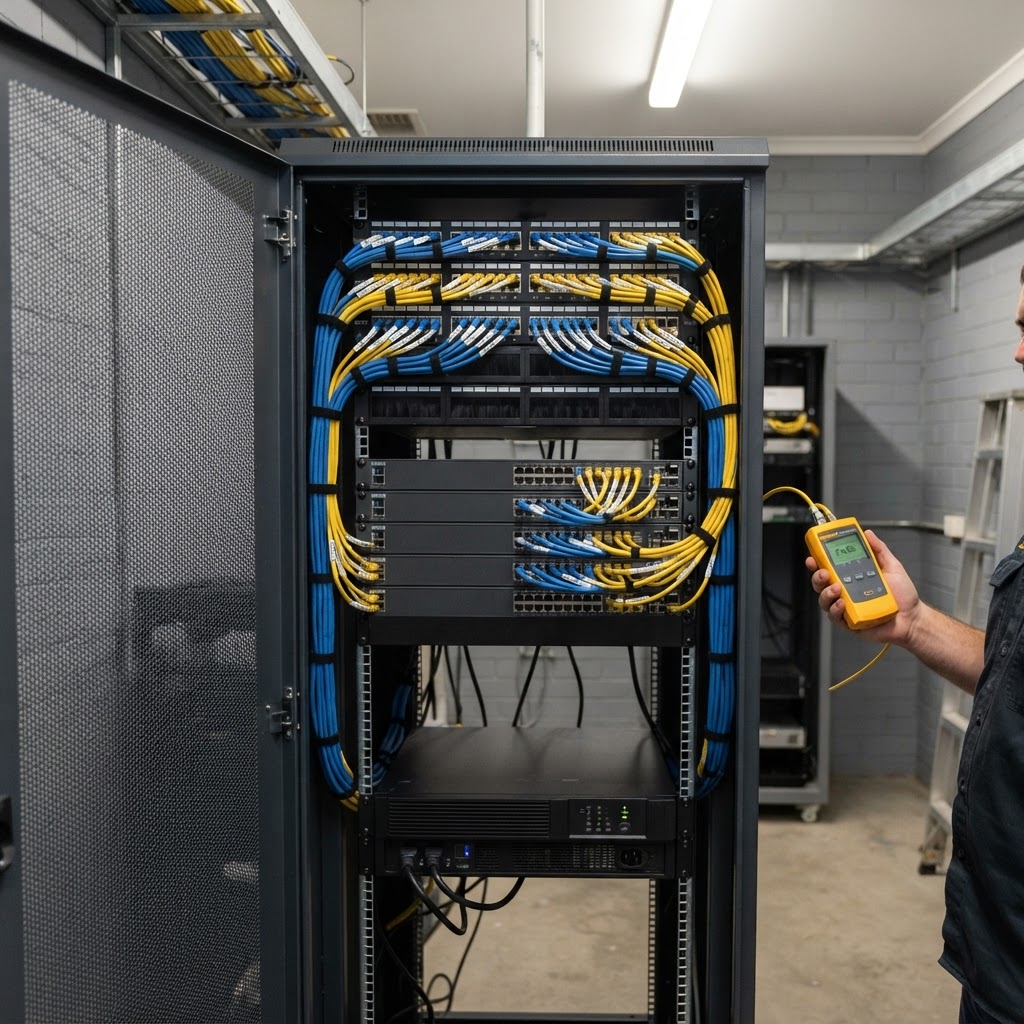
In Australia, fixed network cabling is regulated. It must be done by a registered cabler, meet the AS/CA S009 Wiring Rules, and come with a written statement saying so. Beyond the law, a good cabinet is sized for growth, on its own power with a UPS, kept cool, and labelled so the next person can work on it. Here is what that looks like, and a calculator for your size.
Rules checked on ACMA's website, 30 October 2026.
- ACMA Cabling Provider Rules 2025
- AS/CA S009 Wiring Rules
- Cabinet size calculator
Reviewed by Blake Bath, General Manager, on 30 October 2026.
What the law requires
Four rules every cabling job must meet.
From ACMA's summary of the Telecommunications (Cabling Provider) Rules 2025.
A registered cabler does the work
Telecommunications, fire, security and data cabling must be done by a registered cabler with the right kind of registration and competencies. Someone unregistered can only work under their direct supervision.
- Four registrars in Australia
- Registration category matters
- Supervision must be direct
The work meets AS/CA S009
AS/CA S009:2020, the Wiring Rules, is the installation standard for customer cabling. Among other things it requires telecommunications cabling to be separated from electrical cabling.
- Separation from power cabling
- Only compliant labelled equipment
- Applies to every job, big or small
You get a written statement
After each job the cabler certifies in writing that the work complies with the Wiring Rules, gives you a copy, and keeps one for at least a year.
- ACMA form or their own statement
- Often attached to the invoice
- File it with your site records
Electrical work is separate
The cabinet's power circuit, RCD protection and earthing are electrical work under AS/NZS 3000 and need a licensed electrician, not a cabler.
- Dedicated circuit
- RCD or RCBO protection
- Earth bond to the cabinet
Cabinet size calculator
How big does your cabinet need to be?
Enter your network points and what else goes in the rack. The result lists the gear, the rack units it takes, and a cabinet size with spare space. Copy it for your quote.
A first-pass size from your point count. A site survey confirms depth, power, cooling and where the cabinet can go.
Suggested cabinet
12Uwall-mount
About 8U of gear, 11U with 30% spare.
| Item | Qty | Space |
|---|---|---|
| 24-port patch panels | 2 | 2U |
| Horizontal cable managers | 2 | 2U |
| 48-port switches | 1 | 1U |
| Gateway | 1 | 1U |
| UPS | 1 | 2U |
- In an office or occupied room, look at noise and heat. A cupboard with no airflow cooks gear in summer.
- Fixed cabling must be done or directly supervised by a registered cabler, who gives you a written statement that it meets AS/CA S009.
Which standards apply
The law, and the design standards on top.
AS/CA S009 and the Cabling Provider Rules are the legal requirement. The AS/NZS standards are the design and build standards a good installer works to.
| Standard | What it covers | Status |
|---|---|---|
| Cabling Provider Rules 2025 | Who may do cabling, supervision and the written statement | Law, enforced by ACMA |
| AS/CA S009:2020 | Installation requirements for customer cabling (the Wiring Rules) | Required by the Cabling Provider Rules |
| AS/NZS 3000 | Electrical wiring rules for the cabinet's power | Required for electrical work |
| AS/NZS 3080 | Generic structured cabling and performance classes | Design standard |
| AS/NZS 3084 | Pathways and spaces for telecommunications in commercial buildings | Design standard |
Our view
The cabinet is the part of the network nobody sees until it fails.
We build networks on UniFi, and the gear in the cabinet is the easy part. What decides whether a site is easy to support for the next ten years is the cabinet: whether there is room for one more switch, whether the UPS will carry the gateway through a blip, and whether every port is labelled to match the drawings.
Every UniFi device we supply carries Ubiquiti's UI Care advance replacement, and our Leader Elite Integrator status extends the warranty on eligible gear to three years. Neither helps if a swap means tracing unlabelled cables in a hot cupboard. So we treat the cabinet as part of the job, not something left to whoever ran the cable.
What good looks like
Six things a good cabinet has.
- Room to grow
Sized for today's gear plus spare space, so the next switch does not mean a new cabinet.
- Its own power and a UPS
A dedicated circuit, a rack PDU rather than power boards, and a UPS that carries the gateway and switches through short outages.
- Air that can move
Front-to-back airflow, blanking panels in empty spaces, and no solid door on a cupboard with no ventilation.
- Temperature watched
Kept in ASHRAE's recommended 18 to 27 degree intake range, with an alert when it climbs.
- Every cable labelled
Both ends, matching the patch panel, the switch port and the drawings. Short patch leads, not two-metre loops.
- Locked, in a locked room
The cabinet is the physical edge of your network. Lock it, and control who can get into the room.
Cabling
Cat6A for new builds, and why heat matters.
For a new commercial install we use Cat6A. It carries 10 Gbps to the full 100 metres, and its construction copes better with the heat that builds up when large bundles carry high-power PoE to Wi-Fi 7 access points and cameras.
Bundles of PoE cable get warm. Keep them loosely dressed with hook-and-loop ties rather than tight cable ties, follow the manufacturer's bend radius, and keep data cable separated from power cable, which AS/CA S009 requires anyway.
Every link is tested on install and the results kept. If a cabler cannot give you test results and the written statement, the job is not finished.
Mistakes we see
Six cabinets we have been called to fix.
- No written statement from the cablerAsk for it. It is required, and it tells you who did the work.
- A full cabinet on day oneThe next switch means a rebuild. Allow spare space.
- Power boards daisy-chainedUse a rack PDU on a dedicated circuit.
- A sealed cupboardGear cooks over a summer weekend with no airflow or monitoring.
- No labels, or labels that no longer matchEvery move costs time tracing cables.
- A UPS with a dead batteryUPS batteries wear out. Test them every year.
Cost
How a cabinet build is priced.
We quote cabinet builds as a project after a site survey, because the price depends on the point count, cable run lengths, the room and the power available. You approve the scope and price before any gear is ordered. The on-site survey is free, and you get the design and quote whether you go ahead or not.
How we build it
From survey to sign-off.
- Step 1Survey
Points, run lengths, the room, power and cooling.
- Step 2Design
Cabinet size, layout, cabling category, UPS and power plan.
- Step 3Build
Cabling by registered cablers to AS/CA S009, labelled and tested.
- Step 4Hand over
Test results, the written cabling statement, labels and as-built drawings.
- Step 5Check yearly
UPS battery, temperature, labels and spare capacity reviewed.
Related services
The cabinet holds the network. Here is the rest of it.
Cabinet, cabling, switching, Wi-Fi and cameras are designed together.
- UniFi networksWhat goes in the cabinet.
- Site surveyPoints, cabling runs and cabinet position.
- UniFi camerasRecorders and PoE load in the cabinet.
- Infrastructure designComms rooms and multi-cabinet sites.
- Managed networksThe cabinet looked after once it is built.
- Backup and recoveryWhat the UPS is protecting.
Get help your way
Six ways to reach us. Pick whichever suits you.
Helpdesk hours are Monday to Friday, 8am to 5pm AEST. On Advantage and above, emergencies get a response within 1 hour and outages within 2, with 24/7 best-effort escalation.
- Call 07 3114 2808
An engineer answers Monday to Friday, 8am to 5pm AEST. After hours, weekends and public holidays, Chip, our AI agent, answers on the same number or on 07 3180 0965, logs it and escalates urgent incidents to the on-call engineer.
Call now - Email the helpdesk
Send it to helpdesk@realbytes.com.au and a ticket is logged straight away, with a reference number you can quote.
Email us - Client portal
Log and follow your tickets, see what we are working on and who has it.
Open the portal - Remote support
When an engineer asks to see your screen, start a secure session here. You start it, so nobody sees your screen until you do.
Start a session - Chat in Microsoft Teams
Clients can message Chip, our AI assistant, in Teams to log a request without leaving their desk.
How clients reach us - Service status
Check whether Microsoft 365 or another cloud service is down before you lose an hour troubleshooting.
See live status
Questions
What people ask about network cabinets.
Does network cabling have to be done by a registered cabler?
Yes. Under the Telecommunications (Cabling Provider) Rules 2025, telecommunications, fire, security and data cabling must be done by a registered cabler, or by someone they directly supervise. The work must meet AS/CA S009:2020, the Wiring Rules. Plugging in a patch lead is not cabling work; running and terminating fixed cable is.
What paperwork should I get after a cabling job?
A written statement from the cabler certifying the work complies with the Wiring Rules. ACMA requires the cabler to give a copy to the customer and keep one for at least a year. It can be ACMA's cabling advice form or their own statement, for example attached to the invoice. Ask for it every time.
What size network cabinet do I need?
Work it out from your network points. Each 24 points needs a patch panel and a cable manager, plus switches, a gateway and a UPS. Add spare space for growth. Most small offices land on a 12U to 22U cabinet; the calculator on this page does the sum.
What temperature should a network cabinet run at?
ASHRAE's recommended intake range for IT equipment is 18 to 27 degrees. A cabinet in a cupboard with no airflow can run well above that in a Queensland summer. Monitor the temperature and get an alert when it climbs.
Cat6 or Cat6A for a new office?
Cat6A for new commercial installs. It carries 10 Gbps to the full 100 metres, where Cat6 is rated for 10 Gbps over shorter runs, and it handles the heat of high-power PoE in large bundles better. That matters for Wi-Fi 7 access points and PoE cameras.
How often should a cabinet be checked?
At least once a year: UPS battery and self-test, temperature history, labels still matching, spare ports and power, and the as-built drawings up to date. Check sooner after any move, add or change.
Next step
Not sure what state your cabinet is in?
Send us a photo of your cabinet and your point count. An engineer will tell you whether it needs a tidy, a rebuild or nothing at all.

Keep reading
- UniFi networks The gear we put in the cabinet.
- Site survey The first step.
- Wireless security guide The access points the cabinet feeds.
- Managed networks Looking after it once it is built.
Reviewed by Blake Bath, General Manager, on 30 October 2026. Cabling rules from ACMA, checked 30 October 2026. Temperature range from ASHRAE's recommended envelope for IT equipment. UI Care and the Leader Elite Integrator warranty from Real Bytes' UniFi partner arrangements. ACMA, Cabling Provider Rules; ACMA, Work as a registered cabler; ACMA, Cabling standards and regulations