
 Remote Support
Claude vs Microsoft Copilot vs ChatGPT vs Gemini: the 2026 guide for Australian businesses
The AI assistant market has moved fast, and the tools have grown from chatbots into agents that do real work. Here is where each one shines, what they cost in Australian dollars right now, and our verdict: for most Australian businesses, the smart money lands on Microsoft 365 Copilot and Claude.
Published August 2026. Pricing and features checked 3 August 2026 against vendor pages and sources linked at the end. About a 20-minute read.
In this guide
- The comparison at a glance
- How to get each one
- Claude, including Cowork
- Microsoft 365 Copilot
- ChatGPT
- Gemini
- Which AI works with Xero and MYOB
- Our verdict: why Copilot and Claude lead
- Your first 30 days
- Prompts you can steal
- Quick wins by industry
- The dos and the don’ts
- A one-page AI policy starter
- Questions we hear most
According to the Australian Bureau of Statistics, 12 per cent of Australian businesses used AI in 2024-25, and among large firms it was 35 per cent, up from 9 per cent just three years earlier, with professional services and financial services firms leading the way at about one in four. The direction is obvious. What is less obvious is which assistant to pick, because the honest answer depends on what your business actually does all day.
This guide compares the four heavyweights, Claude, Microsoft 365 Copilot, ChatGPT and Google Gemini, plus a few worth knowing about, and then covers something most comparisons skip: how to use them well, and the mistakes that have already cost Australian organisations money and reputations.
Our verdict, up front
The strongest setup for most Australian businesses in 2026 is a pairing: Microsoft 365 Copilot embedded in the apps where your work already happens, plus Claude for the work that has to be excellent.
Copilot wins on position. It is the only assistant grounded in your own emails, meetings and files, it inherits your permissions and compliance controls, and Australia is in the first wave for in-country data processing, due by the end of 2026.
Claude wins on output. Its writing and analysis are the best regarded in the market, and with Claude Cowork it does not just draft your work, it completes it: files organised, spreadsheets built, reports formatted, on its own.
ChatGPT remains a brilliant all-rounder and the biggest name going, and Gemini is the value pick inside Google Workspace shops. Both are covered in full below.
Free download: The Practical AI Guide for Australian Businesses
8-page PDF covering Claude and Copilot setup, copy-paste prompt templates, dos and don'ts, and a 30-day rollout plan. Australian edition, prices in AUD, July 2026.
At a glance
| Tool | Best for | Business pricing (AU) | Where it lives | Trains on your data? |
|---|---|---|---|---|
 Claude Anthropic Our pick | Long documents, quality writing and analysis, agentic work (Cowork, Claude Code) | Pro about A$28/mo per person; Team about A$28 to A$36 per seat/mo (2+ seats). Billed in USD (US$20 to US$25), GST added | Web, desktop and mobile apps, plus add-ins for Word, Excel, PowerPoint, Chrome and Slack | Team and Enterprise: no training by default. Personal plans: only if you opt in |
 Microsoft 365 Copilot Microsoft Our pick | AI inside the Microsoft apps you already use, grounded in your own work data | Copilot Chat: included free with M365 plans. Paid add-on: Copilot Business A$26.91/user/mo on promo (normally A$31.40); enterprise A$44.90/user/mo. Annual terms, ex GST, on top of a Microsoft 365 licence | Word, Excel, PowerPoint, Outlook, Teams, plus the Copilot app and agents | No. Prompts, responses and your Microsoft Graph data are not used to train the models |
 ChatGPT OpenAI | All-round assistant with the biggest ecosystem: images, video, voice, custom agents | Business about A$28/user/mo annual (about A$36 monthly, 2+ seats); Plus about A$28/mo for individuals. Billed in USD (US$20 to US$25), GST added | Web, desktop and mobile apps, connectors to Microsoft 365, Google Drive, Slack and more | Business and Enterprise: no training by default. Free, Go, Plus and Pro: trains by default unless you opt out |
 Gemini | Google Workspace businesses, huge context windows, video generation, NotebookLM-style research | Included in paid Workspace plans at no extra AI add-on cost; consumer Google AI Pro A$32.99/mo | Gemini app, plus Gmail, Docs, Sheets, Meet and Gemini Notebook | Workspace: no training on your company data. Consumer: conversations can be reviewed and used unless you switch it off |
 Perplexity Perplexity AI | Research and sourced answers with citations you can check | Pro about A$28/mo (US$20); Enterprise from about A$57/seat/mo (US$40) | Web, apps and the Comet browser | Configurable; business plans exclude training. Check settings on personal accounts |
AgentAus Australian | Onshore, high-security access to Claude and ChatGPT models with Australian data residency | Free tier; Standard A$24/mo; Professional and Business A$107/seat/mo; enterprise custom. Ex GST | Its own secured web platform, with on-premises options for enterprise | States data stays in Australia and is not used for training |
Microsoft prices are from Microsoft's Australian pricing pages and exclude GST. Google AI consumer prices are as listed on Google's Australian subscriptions page. Anthropic, OpenAI and Perplexity bill in US dollars, so their AUD figures here are approximate, converted at US$1 ≈ A$1.42 (the market rate at 1 August 2026), quoted ex GST and rounded; 10% GST is added at checkout for Australian customers, and the AUD amount moves with the exchange rate. Always confirm at checkout.
The budget cheat sheet
Here is what the realistic options actually cost per person, in Australian dollars, once GST is in the picture. Annual-term prices throughout.
| Option | Per month ex GST | Per month with GST | Per year with GST |
|---|---|---|---|
| Copilot Chat (with any Microsoft 365 business plan) | Included | Included | A$0 extra |
| Gemini (with any paid Google Workspace plan) | Included | Included | A$0 extra |
| Microsoft 365 Copilot Business (promo to end of 2026) | A$26.91 | A$29.60 | about A$355 |
| Claude Team (standard seat) | about A$28 | about A$31 | about A$376 |
| ChatGPT Business | about A$28 | about A$31 | about A$376 |
| Google AI Pro (individual) | about A$30 | A$32.99 | about A$396 |
| Microsoft 365 Copilot (enterprise add-on) | A$44.90 | A$49.39 | about A$593 |
| The verdict pairing: Copilot Business + Claude Team | about A$55 | about A$61 | about A$731 |
Add the cost of the base Microsoft 365 or Google Workspace licence you already pay for. If your business is GST-registered, the GST component is generally claimable as an input tax credit, so the ex GST column is your true cost. Claude Pro for a sole trader drops to about A$313 a year if you pay the US$200 annual price up front.
How to get each one
Every assistant here is free to try. Each card shows what the tool is best for, the free option, the business pricing, whether it trains on your data, and the official web, phone and desktop access points straight from each vendor.
Claude
Anthropic
Our pickBest for
Long documents, quality writing and analysis, and agentic work like Cowork and Claude Code.
Free option
Free chat with usage limits
Business from
Pro about A$29/mo; Team about A$29 to A$36 per seat/mo, GST added. Fable 5 (frontier tier) is included with Max and premium Team and Enterprise seats, pay-as-you-go on Pro.
Trains on your data?
No training on business plans (Team and Enterprise) by default. Personal plans only if you opt in.
Microsoft 365 Copilot
Microsoft
Our pickBest for
AI inside the Microsoft apps you already use, grounded in your own work data.
Free option
Copilot Chat free with a Microsoft 365 work account
Business from
Paid add-on A$26.91 to A$44.90/user/mo ex GST, on top of M365
Trains on your data?
No. Prompts, responses and your Microsoft Graph data are not used to train the models.
ChatGPT
OpenAI
Best for
All-round assistant with the biggest ecosystem: images, video, voice and custom agents.
Free option
Free chat with usage limits
Business from
Business about A$29/user/mo annual; Plus about A$29/mo, GST added
Trains on your data?
No on Business and Enterprise. Free, Go, Plus and Pro train by default unless you opt out.
Google Gemini
Best for
Google Workspace businesses, big context windows, video generation and NotebookLM research.
Free option
Free chat with usage limits
Business from
Included in paid Workspace plans; consumer Pro A$32.99/mo
Trains on your data?
No training on Workspace company data. Consumer conversations can be used unless you switch it off.
Perplexity
Perplexity AI
Best for
Research and sourced answers with citations you can check.
Free option
Free with usage limits
Business from
Pro about A$29/mo; Enterprise from about A$58/seat/mo, GST added
Trains on your data?
Business plans exclude training. Check the settings on personal accounts.
AgentAus
Australian
Best for
Onshore, high-security access to Claude and ChatGPT models with Australian data residency.
Free option
Free tier
Business from
Standard A$24/mo; Professional and Business A$107/seat/mo ex GST
Trains on your data?
States data stays in Australia and is not used for training.
For business use, sign in with your work account on the business tiers, not a personal one, so the vendor's data-protection terms apply. Copilot Chat is included free when you sign in with a Microsoft 365 work account at copilot.cloud.microsoft. USD-billed prices convert to AUD at the market rate and move with it; confirm at checkout.
In practice
What each one actually looks like
Specs and pricing only go so far. Here is the real interface for each of our three leads, with a short explainer on the parts worth knowing before you sign in for the first time.
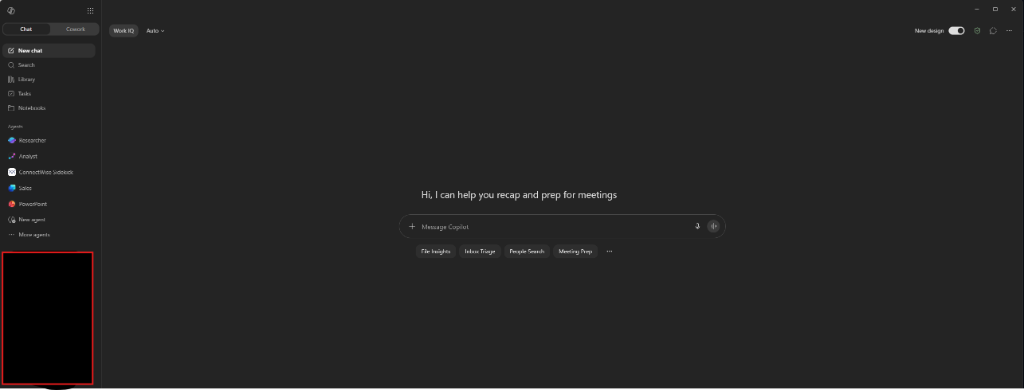
AI living inside the apps you already open
Copilot meets you where your work already happens. The sidebar is not just chat, it is the agent library, and the greeting surfaces the meeting and inbox tasks that eat most of an admin day.
- Built-in agents (Researcher, Analyst, Sales, PowerPoint) sit one click away, so you do not have to build your own to get value.
- The opening prompt offers to recap and prep for meetings, the exact job most owners would hand to an assistant first.
- Action chips (File Insights, Inbox Triage, People Search, Meeting Prep) show the four jobs Copilot is tuned for out of the box.
Screenshots are for illustration only. Interfaces change often, and the exact agents, models and chips you see will depend on your plan and tenant settings.
The quality and agents pick
Claude
Anthropic's Claude has quietly become the tool professionals reach for when the output has to be good, and the 2026 model lineup is its strongest yet. Claude Sonnet 5 (June 2026) is the fast everyday default, built to run agents cheaply at close to flagship quality. Claude Opus 5 (July 2026) is the flagship, and its signature improvement is discipline: Anthropic says it is much stronger at checking and iterating on its own work, roughly doubling its predecessor's score on frontier agent benchmarks at the same price. And above both sits Claude Fable 5 (June 2026), Anthropic's frontier tier: a general-release version of its research-grade Mythos model, built for the most demanding, longest-running work, included with Max plans and premium Team and Enterprise seats and available pay-as-you-go on Pro. Anthropic's own advice is that Opus 5 covers most professional workloads at half Fable's price, which is refreshingly honest guidance from a vendor. All three models take up to a million tokens of context, around 700,000 words, so Claude will digest a stack of contracts, a year of board papers or an entire data room in one sitting and reason across the lot. The reputation is for prose that does not read like it came from a machine, faithful handling of complicated multi-part instructions, and a greater willingness than rivals to say when it is not sure. Independent testing backs it: post-launch benchmark roundups put Opus 5 ahead of GPT-5.6 on nine of twelve shared coding tests, and comparative reviews rank it first for writing quality, and Fable 5 leads the hardest benchmarks outright.
Where Claude has really broken away, though, is agentic work: AI that does the task rather than chats about it. Claude Code, its developer tool, is a favourite among software teams. And in January 2026 Anthropic launched Claude Cowork, which brings the same approach to everyone else.
What Claude Cowork actually does
Cowork is best understood as a capable offsider you brief rather than a chatbot you talk at. You point it at a folder and describe an outcome, and it goes away and does the work: tidying and renaming hundreds of files, building a spreadsheet with working formulas from a pile of invoices, turning scattered notes into a formatted report or slide deck, or researching a topic and writing it up. It plans multi-step jobs, checks in when it needs a decision, and can run several workstreams at once.
Two features make it stand out for busy owners. Sessions can run in Anthropic's cloud, so a long job keeps going after you close the laptop, with progress notifications to your phone. And it supports scheduled tasks, so a weekly report can build itself before Monday's meeting. Cowork shipped on Mac and Windows first, reached general availability in April 2026, and began rolling out to web and mobile in July 2026, starting with subscribers on its top-tier Max plans (from about A$142 a month). It is included with paid Claude plans from Pro up. Anthropic's own analysis of 1.2 million Cowork sessions found more than 90 per cent of usage is non-coding work, with business operations the biggest single category, which tells you who it is really for.
The fine print: agent sessions consume your usage allowance much faster than chatting, folder access deserves care (work on copies and keep backups, as early preview testers learned the hard way), and like every AI it still needs its output checked.
The rest of the Claude package
Beyond Cowork, Claude offers Projects (shared workspaces with standing instructions and reference files), Artifacts, memory, deep research reports, and connectors into Google Drive, Gmail, Slack, Notion, GitHub and Microsoft 365. The Office add-ins now span Excel, PowerPoint and Word, with Outlook in beta, and since March they share context with one another, useful when the financial model has to become the board deck. A telling endorsement: Microsoft itself now offers Anthropic's models as an option inside parts of Copilot, so even Redmond rates the engine.
New in Claude this year
- February to May: the Office add-ins arrived: Excel and PowerPoint first, Word in May, Outlook in beta, with a March update adding shared context across open files and reusable Skills such as financial model builders.
- 9 June: Claude Fable 5 launched: the frontier tier above Opus, a safe-for-general-use version of the research-grade Mythos 5, for work where peak capability matters more than price.
- 30 June: Claude Sonnet 5 released: near-flagship quality at a lower price, the new everyday default, built for running agents cheaply.
- 7 July: Cowork reached web and mobile in beta, with cloud sessions that keep working after you close the laptop, scheduled recurring tasks and approvals from your phone.
- 10 July: memory was rebuilt into structured, editable entries, so Claude carries your business context across conversations and you can see and prune exactly what it remembers.
- 14 July: self-serve HIPAA-grade configuration arrived, worth a look for health businesses handling sensitive records.
- 23 July: voice mode was upgraded to the full model lineup and connected tools (Gmail, Slack, Calendar), across 11 languages.
- 24 July: Claude Opus 5 released: million-token context, sharper self-verification, and the same price as its predecessor.
For teams, the Claude Team plan runs from two seats, at about A$28 a seat a month on an annual term (billed as US$20), with SSO, admin controls and a contractual default that your content is not used for model training. On personal plans, chats are only used for training if you explicitly opt in.
Weaknesses? Claude does not generate images or video natively (it does now hold capable voice conversations), so marketing teams will still want another tool for visuals. Its usage limits are real, especially with heavy Cowork or Claude Code use. And its plugin and custom-agent ecosystem, while growing quickly, is smaller than OpenAI's.
The embedded workhorse
Microsoft 365 Copilot
Microsoft 365 Copilot answers a different question. Instead of "which AI is smartest?", it asks "where does your work already live?". For most Australian businesses the answer is Outlook, Teams, Word and Excel, and that is exactly where Copilot sits. It drafts and rewrites in Word, analyses and charts in Excel, builds decks in PowerPoint, summarises threads and drafts replies in Outlook, and recaps meetings with action items in Teams. Agent Mode, generally available in the Office apps since April 2026, handles multi-step jobs inside the documents themselves, and included agents like Researcher, Analyst and Facilitator take on deeper research and data work.
Copilot's superpower is grounding. Because it reads your emails, calendar, chats and files through Microsoft Graph, it can answer questions no generic chatbot can, like "what did we promise this client across the last three meetings, and what is still outstanding?". It respects your existing file permissions, honours sensitivity labels, logs interactions for compliance through Purview, and Microsoft states plainly that prompts, responses and Graph data are not used to train the underlying models. For regulated industries there is another point in its favour: Microsoft has put Australia in the first wave of countries getting in-country Copilot processing, due by the end of 2026, which matters for data-sovereignty conversations.
Under the hood Copilot is now genuinely multi-model, and Microsoft has been quick on the draw. OpenAI's GPT-5.6 became the default in July 2026, Anthropic's Claude became selectable in June, and the newest Claude models landed almost immediately after launch: Claude Sonnet 5 arrived in PowerPoint within days of its June release, and Claude Opus 5 rolled out across Word, Excel, PowerPoint and Copilot Chat within days of its late-July release. Even Anthropic's frontier Fable 5 is available inside Copilot as an admin-enabled option. Microsoft's own MAI models handle image generation inside PowerPoint. One naming trap to know: Microsoft also calls its Copilot agent workspace “Cowork”, which is a different product from Claude Cowork. Either way, you are getting frontier models wrapped in Microsoft's security envelope.
What Microsoft shipped this year
- 22 April: Agent Mode went generally available in Word, Excel and PowerPoint: multi-step jobs done inside the document, spreadsheet or deck rather than in a chat window.
- 1 May: Agent 365 went GA, a governance layer that registers and audits AI agents the way you manage staff accounts.
- 2 June: Word switched to direct document editing by default (reviewable and reversible), and MCP-based connectors to outside business systems reached general availability.
- 16 June: Claude became selectable in Copilot Chat.
- 1 July: the big monthly drop: Audio Overviews in Word with live voice Q&A, Outlook reasoning across your whole inbox and calendar, PowerPoint’s Agent Mode building decks from your files and meetings, and generated files inheriting sensitivity labels automatically.
- 9 July: GPT-5.6 became the default model across the suite.
- 15 July: MCP-based agents became usable inside Word, Excel, PowerPoint and Outlook, and brand kits arrived so output matches your visual identity.
- Late July: Claude Opus 5 rolled out across the apps, responses gained inline images, Copilot Notebooks were redesigned inside OneNote, and Excel began receiving Researcher-style multi-agent web research, reaching business plans through August.
The running list lives in Microsoft’s Copilot release notes, which are worth a skim each month if you own the licences.
One name, three products: know which Copilot you are using
Here is the trap in the naming. "Copilot" is three different products, and the difference matters enormously for a business. There is the consumer Copilot app anyone can use with a personal Microsoft account. There is Copilot Chat, included at no extra cost when staff sign in with their work account on a Microsoft 365 business or enterprise plan. And there is the paid Microsoft 365 Copilot add-on that puts AI inside the Office apps and connects it to your work data. Staff cheerfully call all three "Copilot", and the gap between them is where the risk lives.
| Copilot (consumer app) | Copilot Chat (free at work) | Microsoft 365 Copilot (paid) | |
|---|---|---|---|
| Cost | Free with a personal account | Included with Microsoft 365 business and enterprise plans | A$26.91 to A$44.90 per user per month ex GST |
| Sign-in | Personal Microsoft account | Work account | Work account plus a Copilot licence |
| What it can see | The web, plus whatever you type or upload | The web, plus files you upload in the chat. It cannot see your organisation’s data | The web, plus your work data: email, meetings, chats and files, respecting each person’s permissions |
| Data protection | Microsoft’s consumer terms; sits outside your business’s controls | Enterprise data protection: prompts and responses get the same contractual protection as Exchange and SharePoint, and are not used to train the models | The same enterprise data protection, plus sensitivity labels, retention policies and Purview auditing across Copilot use |
| Agents | Not built for business use | Can run agents on metered pay-as-you-go billing | Researcher, Analyst and Facilitator included, plus Agent Mode in the Office apps |
| What’s good | Handy for personal life admin | A genuine A$0 win: a sanctioned, protected chat that removes the excuse for shadow AI, with web answers and safe file uploads | The full experience: answers grounded in your own business, AI inside every Office app, agents included |
| The risk | Staff using it for work puts company information outside your tenant’s protections. Block it or redirect people to the work version | Answers about your business are generic, because it cannot see your data. And if you enable metered agents, set a spend cap first | Cost stacking across seats, shelfware if you skip training, and oversharing if SharePoint permissions are messy |
Enterprise data protection applies whenever staff use Copilot Chat or Microsoft 365 Copilot signed in with a work account, per Microsoft's enterprise data protection documentation. For personal use outside work there is also Microsoft 365 Premium at A$33 a month, which adds Copilot to personal Office apps; it is not a business product.
The playbook that falls out of this table is simple: point staff away from the consumer app at work, switch on Copilot Chat for everyone as the free, protected baseline, and buy paid Copilot seats for the roles that live in documents, email and meetings, where the grounding earns its money.
Pricing that finally fits SMBs
The original US$30-per-user price tag put many small businesses off. That has changed. Microsoft 365 Copilot Business, a small-business plan for 1 to 300 seats, is currently A$26.91 per user per month on an annual term (ex GST, on promotion from A$31.40, with the promo price extended to the end of 2026), on top of an existing Microsoft 365 Business licence. Bundles sweeten it further: Business Standard with Copilot is A$35.20 and Business Premium with Copilot A$47.90 per user per month annually. Larger organisations pay A$44.90 per user per month for the enterprise add-on. And every business on a Microsoft 365 plan already has Copilot Chat at no extra cost, a secure, web-grounded chat with enterprise data protection that is a perfectly good way to start.
The honest caveats
Copilot's output quality, while much improved, is still sometimes beaten by the frontier chat tools on pure reasoning and creative work, and reviewers describe its confident-but-wrong moments as its biggest trap: Copilot drafts, humans verify. Industry analyses also show a large share of paid seats going unused when businesses buy licences without training people, so budget for enablement, not just licences. The sharpest edge is oversharing: Copilot surfaces anything a user already has permission to see, and years of sloppy SharePoint permissions can suddenly become very findable. Clean up access before you switch it on. None of these are reasons to avoid Copilot; they are reasons to roll it out properly. The Australian Public Service trial found the average user saved around an hour a day on tasks like summarising and first drafts, but 60 per cent of participants still needed to edit outputs before use, which is the whole game in one statistic.
The all-rounder everyone already knows
ChatGPT
ChatGPT remains the biggest name in the room: in late July 2026 OpenAI announced it had passed a billion weekly users, along with two million business customers. That familiarity is a real business asset: your staff have probably already used it, which shortens training to near zero. The current GPT-5.6 model family is excellent across the board, and the feature set is the broadest going: image generation, Sora video, voice conversations, deep research reports, data analysis, custom GPTs and an agent mode that can browse, fill forms and complete multi-step tasks on the web.
For business use, ChatGPT Business is about A$28 per user per month billed annually, or about A$36 monthly (billed as US$20 and US$25, minimum two seats), and comes with the important guarantee: no training on your business data by default, plus SSO, admin controls and connectors into Microsoft 365, Google Drive, Slack and GitHub. Individuals have the free tier, the budget Go plan at about A$11 a month (US$8, and OpenAI has flagged it may include ads), Plus at about A$28 (US$20) and the heavy-duty Pro at about A$285 (US$200).
The main watch-out sits on the consumer side: free and personal-plan conversations are used for model training by default unless you opt out in settings. If your team uses personal ChatGPT accounts for work, that is a data-governance problem hiding in plain sight, and it is the single strongest argument for putting staff on a Business plan.
The bundled value play
Gemini
Google's pitch is simple: if you already pay for Google Workspace, Gemini is included. Paid Workspace plans build Gemini into Gmail, Docs, Sheets and Meet at no extra AI add-on cost, covering drafting, summaries, natural-language spreadsheet work, meeting notes and translated captions, and Google states that Workspace customer data is not used to train its models. Gemini Notebook (the tool formerly known as NotebookLM) is a genuine standout: feed it your documents and it produces grounded summaries, study guides and remarkably good audio overviews, which teams use to turn dense material into something staff will actually absorb.
On the consumer side, Australian pricing is aggressive. Google AI Pro is A$32.99 a month and stacks in a 1-million-token context window, video generation credits, 5 TB of storage and a YouTube Premium Lite subscription, with a cheaper AI Plus tier at A$7.99. The Gemini app passed 950 million monthly users in mid-2026, and the underlying Gemini 3 series models are strong, particularly for multimodal work with video and images.
Caveats: the product lineup is confusing (consumer AI plans, Workspace AI and the separate Gemini Enterprise agent platform all overlap), Google's flagship Pro model updates have run late, and on consumer accounts conversations can be reviewed by humans and retained for up to three years unless you turn activity off, so keep client work on the Workspace side of the fence.
Worth knowing about
Tools on the edges
Perplexity has carved out the research niche: answers with inline citations you can actually check, a choice of frontier models under the hood (including Claude and GPT), and a free tier generous enough to evaluate. Pro is about A$28 a month (US$20). For any role that lives on accurate, sourced answers, it is a worthy sidekick to a main assistant.
AgentAus is the homegrown option worth knowing about: an Australian platform that provides access to Claude and ChatGPT models through its own secured environment, with the pitch that your data stays in Australia and is not used for training. Plans run from a free tier through Standard at A$24 and Professional at A$107 a month ex GST, with team tiers at the same per-seat prices and enterprise options up to air-gapped, on-premises deployment, and it claims Essential Eight ML2 alignment, aimed squarely at defence-adjacent and high-security industries. For most businesses the majors’ own business tiers are protection enough, but if onshore data residency is a hard requirement from your clients, a local platform like this is the most direct way to get frontier models without offshore processing.
Grok, from Elon Musk's xAI, is capable and improving fast, but its brand and X integration make it a harder sell in professional settings. DeepSeek, the headline-grabbing Chinese model family, is remarkably cheap via API, but Australian businesses should note it has been banned on all Australian government devices since February 2025 on security grounds, and several major Australian companies restrict internal use. For anything touching client data, that is disqualifying.
The verdict: why Copilot and Claude lead
Strip away the marketing and every assistant is really competing on two questions: how close is it to your work, and how good is its work. Copilot and Claude each own one of those questions outright, which is why they top this guide.
Copilot owns position. No other assistant sits inside the tools most Australian businesses already run on, reading your actual mailbox, meetings and files, with your existing permissions, sensitivity labels and audit trail carried across. Its agents (Researcher, Analyst, Facilitator) come included, Australia is in the first wave for in-country processing (due by the end of 2026), and at A$26.91 a user a month on the current SMB promotion it now undercuts most rivals' business tiers in straight dollar terms. There is even a free on-ramp in Copilot Chat. And because Copilot is now multi-model, defaulting to GPT-5.6 with Anthropic's Claude selectable, you get frontier engines without betting the business on a single AI lab.
Claude owns output. When the deliverable itself matters, a tender, a board paper, a client report, Claude's writing and analysis carry the strongest reputation in the market, and its million-token context handles document loads that used to need splitting across sessions. The model ladder runs from Sonnet 5 for everyday work through Opus 5 as the flagship to Fable 5 as the frontier tier, so there is a tier for routine drafting and one for the hardest work. Cowork extends that from drafting to doing: the most complete general-purpose agent available today, running long jobs in the cloud, on a schedule if you want, with more than 90 per cent of its real-world use being everyday business work rather than coding. Add the Excel and PowerPoint add-ins, a no-training default from just two seats, and one final point that settles the argument for us: Microsoft itself now offers Claude's models inside Copilot. When your biggest competitor ships your engine, you are doing something right.
None of this makes ChatGPT or Gemini bad choices; they are excellent products with real strengths in breadth, media generation and bundled value. But breadth is not depth. For a business choosing deliberately, Copilot plus Claude covers both halves of the job, position and output, with the cleanest data story and the fewest compromises, at well under A$60 a head a month on annual terms. The Xero and MYOB partnerships push the same way: the accounting platforms Australian small businesses actually run on have picked Claude and Microsoft respectively as their AI engines.
How to choose
Your day runs on Outlook, Teams and Office files
Start with Microsoft 365 Copilot, or the free Copilot Chat if you want to test the water. The grounding in your own mail, meetings and documents is something no standalone chatbot can copy.
Your work is documents, analysis and writing that must be right
Claude. The drafting quality, the long-document stamina and Cowork’s ability to take a folder and return finished work make it the professional’s pick.
You want one tool that does a bit of everything
ChatGPT. Broadest features, biggest ecosystem, least training needed, and images and video included.
You run Google Workspace
Turn on what you are already paying for. Gemini plus Gemini Notebook covers most everyday needs before you spend another dollar.
Research-heavy roles
Add Perplexity for sourced answers.
You need Australian data residency
AgentAus provides Claude and ChatGPT models through an onshore platform that states data stays in Australia and is not used for training. Worth a look for defence-adjacent and high-security work where residency is a hard client requirement.
The pattern that works in practice is the pairing from our verdict: Copilot embedded in the office suite for everyday email, meetings and documents, plus Claude on a business plan for the heavy lifting. On annual terms that combination costs about A$55 a head a month ex GST, which is why the real differentiator is not which logo you pick but how well you roll it out.
Your first 30 days: a rollout plan that works
The pattern behind every successful small-business rollout we have seen, and behind the official advice from business.gov.au and the lessons of the government's own Copilot trial, fits in four weeks.
Week 1: pick two problems and a pilot crew.
Choose one or two visible time sinks (quoting, reporting, inbox triage, meeting follow-ups) and three to five keen staff. Set up business-tier accounts, and switch on the free Copilot Chat for everyone if you are on Microsoft 365. Before anyone touches AI, jot down how long these tasks take today; that baseline is what proves the value later.
Week 2: set the rules before habits form.
Adopt the one-page policy below, tell the team what must never go into an AI tool, and make it company accounts only from day one. If Copilot is on the list, run the SharePoint and OneDrive permissions check this week, before it goes live.
Week 3: train, embed, collect wins.
Run one 45-minute session: the four-part prompt formula, live demos on your real use cases, and the review rule (nothing leaves the building unchecked). Save the prompts that work into a shared library, a Claude Project, or your Copilot prompt gallery so wins compound instead of evaporating.
Week 4: measure, cull, expand.
Compare task times against the Week 1 baseline, ask the pilot crew what stuck, drop the use cases that did not earn their keep, and roll the winners out to the next team. Put a quarterly review in the calendar for pricing, models and the policy.
Prompts you can steal
These are working starting points for the most common jobs we see. Swap the bracketed parts for your own details. The pattern to copy is always the same: goal, context, source material, and the output you expect.
Catch up on a client · Copilot in Outlook or Copilot Chat
Summarise everything from [client name] across email and Teams in the last fortnight. List the commitments we made, the commitments they made, and anything overdue on either side. Then draft a follow-up email that moves [the project] forward, in a friendly, plain-English tone.
Never lose a meeting action again · Copilot in Teams
Review my meetings and chats from this week. Give me every action item assigned to me with its deadline, every decision that affects [project name], and anything I promised someone that has not been done. Format it as a checklist ordered by due date.
Make sense of the numbers · Copilot in Excel
Analyse this sales data. Show month-on-month trends by product line, flag anything unusual or worth investigating, and build a simple chart I can paste into a report for a non-financial audience. Explain the main takeaway in two sentences.
Compare contracts before the lawyer does · Claude
Here are three supplier agreements. Build a table comparing payment terms, termination notice, liability caps and auto-renewal clauses. Flag anything unusual or risky for an Australian small business, and tell me which agreement needs a lawyer’s eyes first and why. Note: this does not replace legal advice.
Turn a folder of invoices into a spreadsheet · Claude Cowork
This folder contains supplier invoices as PDFs. Build me a spreadsheet with one row per invoice: supplier, invoice number, date, amount ex GST, GST and total. Flag duplicates and gaps in invoice numbering, and add a tab totalling spend by supplier and by month. Work on copies and do not modify the original files.
A month of marketing from one article · ChatGPT
Here is our latest article. Turn it into eight LinkedIn posts: a mix of tips, statistics, questions and short stories, each under 120 words, written in a plain Australian voice with no hashtag spam. Give me a suggested posting order across four weeks.
Induction material staff will actually absorb · Gemini Notebook
Using the uploaded procedures and policies, create a one-page induction summary for new staff in plain English, a short quiz to check understanding, and an audio overview they can listen to on their first commute.
Quick wins by industry
Where businesses like yours tend to get the fastest payback:
| Industry | Where the hours come back first |
|---|---|
| Trades and construction | Quotes drafted from site photos and voice notes, invoice chasing, safety and compliance paperwork, tender responses. Start with the assistant on your phone. |
| Retail and hospitality | Product descriptions, rosters and supplier emails, review responses, and a month of social posts from one photo shoot. The image tools in ChatGPT and Gemini earn their keep here. |
| Professional services | Long-document review, engagement letters, file notes and research memos. This is Claude territory, with Copilot handling the inbox and meetings. |
| Allied health and clinics | Referral letters, intake summaries and patient education material, with one hard rule: identifiable patient information only ever goes into a business-tier tool covered by your policy. |
Do's and don'ts
Things you should do, and not do
The same short list behind every successful small-business AI rollout we have seen. Do these, avoid those, and most of the risk falls away on its own.
Things you should do
Start small and pick real problems.
Choose one or two genuine time sinks, quoting, reporting, meeting follow-ups, inbox triage, and pilot there with a handful of keen staff before rolling out wider. This is also the official advice from business.gov.au.
Use business tiers for business work.
The paid business plans of every major tool commit to not training on your data by default. Consumer accounts often do the opposite. This single decision removes most of the data risk for a few dollars a seat.
Write a short AI use policy.
One page is enough: which tools are approved, what data must never be pasted in (client personal information, credentials, anything commercially sensitive), and the rule that a human reviews anything before it leaves the building. The National AI Centre publishes free templates, and its Guidance for AI Adoption boils good practice down to six essentials, including accountability, transparency and human oversight.
Clean up permissions before Copilot.
Copilot shows people whatever they already have permission to see. Audit SharePoint and OneDrive sharing first, or years of accidental oversharing becomes instantly searchable. Microsoft publishes a dedicated oversharing blueprint for exactly this reason.
Teach prompting, briefly.
Microsoft's four-part formula covers it: state the goal, give context, point to the source material, and describe the output you expect (format, length, tone). Show an example of what good looks like, ask for step-by-step reasoning on complex jobs, and iterate rather than accepting the first draft.
Keep humans in the loop, and measure.
The Australian Public Service Copilot trial saved users about an hour a day on summarising and first drafts, yet 60 per cent of outputs still needed editing. Track hours saved on your pilot use cases so the renewal decision is based on your numbers, not vendor marketing.
Back up before you hand an agent your files.
Tools like Cowork and agent modes edit real files. Point them at copies, keep backups current, and review what they did, the same way you would with a new junior employee.
Things you should not do
Do not put personal or client information into consumer AI tools.
The OAIC's guidance is blunt: organisations should not enter personal information, especially sensitive information, into publicly available generative AI. The Privacy Act still applies to what your business does with AI, including what it collects and generates.
Do not publish or file AI output unreviewed.
Australia has already produced the cautionary tales: Deloitte partially refunded the Commonwealth over a $440,000 report that contained fabricated references and an invented court quote, and a Victorian solicitor became the first Australian lawyer sanctioned after filing AI-invented case citations. A global database of hallucinated case law has now logged more than 1,800 court decisions worldwide. Review everything that matters.
Do not let shadow AI spread.
Studies through 2025 found large shares of workplace AI use happening on unmanaged personal accounts, with roughly a quarter of files uploaded to AI tools containing sensitive data. Staff will use AI either way; give them a sanctioned, paid, governed option so they are not improvising with client data.
Do not hand an agent the keys to everything.
Agentic AI that reads email, browses the web and edits files is where the productivity is, and also where the new risk is. Hidden instructions planted in a webpage or document can hijack an agent (prompt injection), which joint guidance from the ACSC and its international partners calls the most persistent and difficult-to-fix threat in agentic systems, and OpenAI itself concedes browser agents may never be fully immune. Give agents the minimum access each job needs, keep logging on, and review what they did.
Do not assume AI output is copyright-safe.
Under current Australian law, copyright needs a human author, so purely AI-generated content likely has no protection at all, and output that closely resembles an existing work can still infringe. Keep humans meaningfully involved in anything you need to own.
Do not set and forget.
The OAIC expects ongoing review, not a one-off tick. Models, prices and terms changed repeatedly in the twelve months before this article; yours to revisit every quarter or two.
Do not buy licences instead of change.
The most common failure mode is not picking the wrong tool, it is paying for seats nobody was trained to use. Enablement, use cases and a policy beat another logo every time.
A one-page AI policy you can adapt
Most businesses never write the policy because it feels like a project. It is not. Adapt these eight lines, put a name in the brackets, and you are ahead of most of the country:
- Approved tools are [Microsoft 365 Copilot and Claude Team] on company accounts only. Personal AI accounts are not used for work.
- Never enter client personal information, staff records, passwords, or commercially sensitive data into any AI tool outside our approved business accounts.
- AI output is a draft. A human reviews and approves anything before it reaches a client, a court, a regulator or the public.
- Facts, figures, names, quotes, citations and legal claims in AI output must be verified against a real source before use.
- AI agents (such as Cowork or agent modes) work on copies of files, not originals, and their changes are reviewed like a new employee’s work.
- The staff member who uses the AI owns the accuracy of the result. "The AI wrote it" is not a defence, here or in court.
- Mistakes and near-misses are reported to [name] without blame, so we can fix the process rather than hide the problem.
- [Name] reviews this policy, our tools and our spend every quarter.
Want a fuller template? The National AI Centre publishes free policy and AI-register templates via business.gov.au.
The Australian rulebook in one paragraph. There is no AI-specific statute yet. The Privacy Act and the Australian Privacy Principles govern personal information used with AI (see the OAIC's guidance on commercial AI products), the government's voluntary Guidance for AI Adoption sets out six practices for doing it responsibly, and the Australian Cyber Security Centre's AI advice for small business covers the security side: control what data goes in, verify what comes out, and vet your vendors.
What’s coming. The direction of travel changed in July 2026: the Prime Minister announced a new Office of AI and work on mandatory Australian AI Standards, with draft standards due late 2026 and legislation flagged for 2027. Separately, from 10 December 2026 privacy policies must disclose automated decision-making that uses personal information. If data residency matters to your clients, note that Microsoft has committed to in-country Copilot processing for Australia by the end of 2026, while most rivals process offshore; ask any vendor where processing happens. None of this should scare you off. Build the habits in this article now and the coming rules will mostly describe what you already do.
Questions we hear most
Is it safe to put company information into these tools?
On the business plans covered here (Microsoft 365 Copilot, Claude Team, ChatGPT Business, Gemini in Workspace), the vendors commit to not training their models on your data by default and give you admin controls, which is exactly why our first rule is business tiers for business work. On consumer accounts, assume the opposite unless you have changed the settings, and never enter client personal information; that is the OAIC’s advice as well as ours.
Do we really need both Copilot and Claude?
No. Plenty of businesses get real value from one. The pairing suits businesses that live in Microsoft 365 and also produce document-heavy, quality-critical work. Start with the tool closest to your biggest time sink, and add the second only when you keep hitting the first one’s limits.
Which AI plays nicest with Xero and MYOB?
For many Australian small businesses the real question is not abstract capability, it is “does it talk to my accounting software?”. In 2026 the answer maps neatly onto our two winners. Xero signed a multi-year partnership with Anthropic in March 2026: its JAX assistant (“Just Ask Xero”) runs on Claude, and Claude users can connect their Xero account through an official connector and ask live questions in plain English: what is our cash position, who is overdue, what happens to cash flow if that big customer pays a month late.
MYOB went the other way, signing a five-year AI partnership with Microsoft in April 2026 that embeds Copilot-family agents across its products for ANZ businesses. So a rough rule for the accounting stack: run Xero and Claude has the inside track; run MYOB and Copilot does. ChatGPT can reach Xero too, but through a technical custom-connector setup rather than an official app, so it is a job for your IT support rather than a tick-box.
The plumbing behind all of this is MCP, an open standard for connecting AI to business systems that Claude, Copilot and ChatGPT all now support, which means the list of tools your assistant can safely reach (CRMs, job management, project trackers) grows by the month.
Can we just use the free versions?
For evaluation, absolutely, and Copilot Chat (included with Microsoft 365) is a useful permanent baseline. Just make sure staff use the work sign-in version, Copilot Chat, rather than the consumer Copilot app, so enterprise data protection applies. For real client work the paid business tiers earn their keep quickly: stronger data protections, higher limits, admin visibility, and the right to say to clients that their information is not training someone’s model.
Who owns what the AI writes? Can we copyright it?
Under current Australian law, copyright needs a human author, so purely AI-generated content likely has no copyright protection at all, and AI output can still infringe someone else’s work. Keep a human meaningfully shaping anything you need to own, and treat the AI as the drafter, never the author.
Can we claim AI subscriptions on tax?
Generally yes. For a business, AI subscriptions are an ordinary deductible expense to the extent they are used for the business, under the same rules as any software subscription: apportion any personal use, keep the invoices, and if you are GST-registered claim the GST credits where GST was charged. There is no special ATO ruling for AI tools, so normal record-keeping applies; confirm the specifics with your accountant.
Will this replace our staff?
The evidence so far says it replaces tasks, not roles. The Australian Public Service trial measured about an hour a day saved on summarising and drafting, with humans still editing most outputs before use. The realistic prize is capacity: the same team getting through more, faster. Position it that way internally, because adoption dies quickly when staff think they are training their replacement.
How do we stop staff using personal AI accounts for work?
Mostly by giving them something better. Studies through 2025 found the large majority of workplace AI use happens on unmanaged personal accounts when employers do not provide a sanctioned option. Provide the paid, governed tool, make the rule explicit in your policy, and the shadow usage largely takes care of itself.
The bottom line
Our verdict is a pairing rather than a single winner. Microsoft 365 Copilot earns its spot because it works where your business already works, wrapped in the permissions, compliance and Australian data residency a business actually needs. Claude earns its spot because the work it produces, and increasingly completes on its own through Cowork, is the best in the market. ChatGPT and Gemini remain excellent, and for some businesses the right call, but if you want a decision rather than a shortlist: put Copilot in your office suite, put Claude on the hard work, put both on business tiers, and wrap them in the one-page policy and the habits above. The businesses winning with AI in 2026 are not the ones with the cleverest model. They are the ones with the clearest habits, and the good news is that both are now cheap enough that the habits are the only hard part.
Sources
- ABS: Business adoption of artificial intelligence accelerates in 2024-25 (June 2026)
- Anthropic: Claude pricing; Claude Cowork product page; Get started with Claude Cowork; Cowork on web and mobile (July 2026); Anthropic consumer terms update (training opt-in); Anthropic: Claude Opus 5 (24 July 2026); Anthropic: Claude Sonnet 5 (30 June 2026); Claude voice mode upgrade (23 July 2026); Claude for Excel and PowerPoint updates (March 2026); The New Stack: Claude across Microsoft Office; Anthropic: Claude Fable 5 and Mythos 5 (June 2026); Claude Fable 5 on your plan; Kingy AI: frontier model benchmarks (July 2026)
- TechCrunch: Claude Cowork expands to mobile and web (July 2026); TechCrunch: Anthropic launches Opus 5 (July 2026)
- Microsoft 365 Copilot Business and Enterprise Australian pricing; Microsoft 365 Copilot privacy and data protection; Microsoft: enterprise data protection in Copilot and Copilot Chat; Copilot licensing; Agent Mode general availability (April 2026); Microsoft: mitigating oversharing for Copilot; Microsoft: in-country data processing for Copilot (November 2025, timeline updated April 2026)
- OpenAI: GPT-5.6 as preferred model in Microsoft 365 Copilot (July 2026); Microsoft Learn: Anthropic models in Copilot apps; Microsoft: Claude Sonnet 5 in Copilot (July 2026); Microsoft: Claude Opus 5 in Copilot (July 2026); Microsoft 365 Copilot release notes; Microsoft: Agent 365 general availability (May 2026); CodingFleet: Opus 5 vs GPT-5.6 benchmarks (July 2026); UniversalNest: GPT vs Claude vs Gemini comparison (July 2026)
- OpenAI: ChatGPT Business pricing; ChatGPT plans; OpenAI: how your data is used; Quartz: OpenAI passes 1 billion weekly users (July 2026)
- Google AI plans, Australian pricing; Gemini for Google Workspace; Google: Gemini Apps privacy; TechCrunch: Gemini approaches a billion users (July 2026)
- Perplexity: official pricing; AgentAus: pricing; Microsoft: Claude Fable 5 in Copilot (June 2026); GovInsider: Australia bans DeepSeek on government devices (February 2025)
- DTA: Australian Government Microsoft 365 Copilot trial evaluation
- Xero: JAX, powered by Anthropic’s Claude; SmartCompany: Xero launches JAX (March 2026); MYOB: AI products with Microsoft (April 2026)
- A&O Shearman: ACSC and partners’ joint guidance on securing agentic AI (May 2026); TechCrunch: OpenAI on prompt injection in AI browsers (December 2025)
- Prime Minister: AI in Australia’s interests (July 2026); Gilbert + Tobin: mandatory AI standards and Office of AI; Norton Rose Fulbright: privacy law reform incl. automated-decision disclosure; Thriday: claiming AI subscriptions as tax deductions
- OAIC: Guidance on privacy and commercially available AI products; business.gov.au: Guidance for AI Adoption; ACSC: AI for small business; business.gov.au: AI for business
- Accounting Times: Deloitte to refund government over AI report (October 2025); ACS Information Age: first Australian lawyer penalised over AI citations (August 2025); Charlotin database of AI-hallucinated case law
- The Register: shadow AI and data pasting, LayerX study (October 2025); Harmonic Security: sensitive data in AI uploads (November 2025)
- Sprintlaw: AI and copyright in Australia; SQ Magazine: Copilot seat statistics (2026); ValueAdd VC: Copilot enterprise adoption data; Microsoft: learn about Copilot prompts; Anthropic: prompt engineering guide
Prices checked 3 August 2026. Microsoft prices ex GST from Microsoft's Australian pages; Google consumer prices as listed for Australia; Anthropic, OpenAI and Perplexity bill in USD, with AUD figures converted at US$1 ≈ A$1.42 (1 August 2026 market rate), ex GST and rounded; GST is added at checkout for Australian customers. Features and prices change frequently; confirm with vendors before purchasing. This article is general information, not legal, financial or privacy advice.
Keep reading
Pick the right AI assistant for your business
We help Australian businesses roll out Copilot, Claude and the rest the right way: tenant ready, data cleaned, policy in place, staff trained. Book a no-obligation review and we will map your options to your actual workload.